Claude Code dangerously-skip-permissions: when is it safe?
For CTOs and engineersHarness and checks · Updated

Filip PapranecFounder, Digitaliko
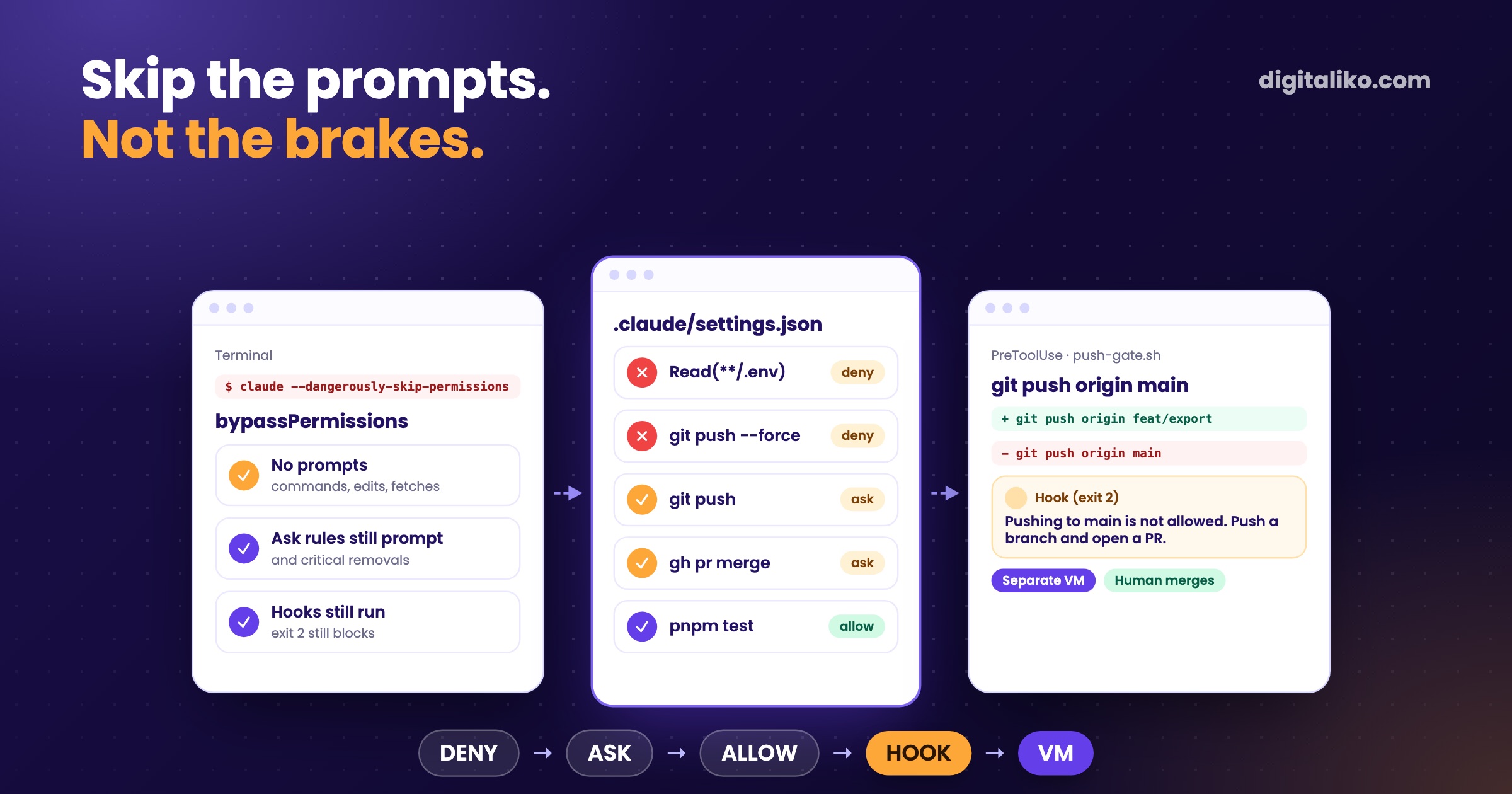
--dangerously-skip-permissions turns off Claude Code's permission prompts for the whole session. It is the same as --permission-mode bypassPermissions, and Anthropic's own docs say to use it only in containers or VMs where Claude Code cannot cause damage. We follow that literally: on a developer's laptop the agent works under allow, ask and deny rules plus hooks, and full bypass runs only in an isolated box with its own accounts.
The short answer for a CTO: do not ban the flag, decide where it is allowed. Rules for the laptop, hooks for what rules cannot see, isolation for anything unattended.
What does --dangerously-skip-permissions actually turn off?
Claude Code has six permission modes. The flag picks the last one:
| Mode | What runs without asking | Where we use it |
|---|---|---|
default | Reads only | Read-only checks in our agent loop |
acceptEdits | Reads, file edits, basic file commands | Interactive work you are watching |
plan | Reads, then a plan you approve | Exploring before a change |
auto | Everything, with a classifier checking actions | Not in production yet |
dontAsk | Pre-approved tools only, the rest is denied | Locked-down CI and scripts |
bypassPermissions | Everything | Isolated boxes only |
"Everything" has exceptions, and they matter. According to the permission modes docs, no mode auto-approves tools matched by an explicit ask rule, recognized rm removals of critical paths, or tools that need a person, such as AskUserQuestion. Hooks keep running too. What bypass does remove is the prompt before writes to protected paths like .git and .claude, which every other mode keeps.
So bypass is not "no rules". It is "no human in the loop". The question is whether anything else is in the loop.
How do allow, ask and deny rules decide?
Rules live in settings.json, as three lists. This is a shortened version from our public Claude Code production starter:
{
  "permissions": {
    "allow": ["Bash(pnpm check)", "Bash(pnpm test:*)", "Bash(bash scripts/gate.sh:*)"],
    "ask": ["Bash(git push:*)", "Bash(gh pr merge:*)", "Bash(vercel --prod:*)", "Bash(wrangler deploy:*)"],
    "deny": ["Read(**/.env)", "Read(**/*.pem)", "Bash(git push --force:*)", "Bash(git reset --hard:*)", "Bash(psql:*)"]
  }
}
The shape is the policy. Allow what the agent needs to check its own work. Ask for anything that leaves the machine: a push, a merge, a deploy. Deny secrets, history rewrites and direct database access.
Claude Code evaluates deny first, then ask, then allow, and the first match wins. A deny can never be carved open by a narrower allow. It also holds across files: a deny in the repository beats an allow in someone's personal settings. That is why team rules belong in the repository's .claude/settings.json, and personal speed-ups in ~/.claude/settings.json.
Permission rules are enforced by Claude Code, not by the model. Instructions in your prompt or CLAUDE.md shape what Claude tries to do, but they don't change what Claude Code allows.
That line is the reason to move every "never do X" from CLAUDE.md into a rule or a hook.
What can a permission rule not see?
A rule matches the command string. Three things slip past it:
- Which branch.
Bash(git push:*)cannot tellgit push origin feat/xfromgit push origin main. Ask on every push and people start clicking yes without reading. - Indirect access. The docs say it plainly: Read deny rules do not cover a Python or Node script that opens the file itself, and a Bash deny does not match the same program inside
sh -c. - Context. A rule does not know who is running the session or what kind of repository it is in.
That is where a PreToolUse hook earns its keep. It gets the full tool call as JSON, can run any logic, and exit 2 blocks the call before permission rules are even evaluated. The core of our push gate, shortened:
CMD=$(jq -r '.tool_input.command // empty')
[[ "$CMD" != *"git push"* ]] && exit 0
BRANCH=$(git -C "${CLAUDE_PROJECT_DIR:-.}" branch --show-current 2>/dev/null)
if [[ "$CMD" =~ [[:space:]:](main|master)([[:space:]]|$) || "$BRANCH" == "main" ]]; then
  echo "Pushing to main is not allowed. Push a branch and open a PR." >&2
  exit 2
fi
The version in our company plugin goes further: it reads the repository's level, so code repositories block pushes to every protected branch for everyone, while documentation repositories let the founder push. A rule cannot express that.
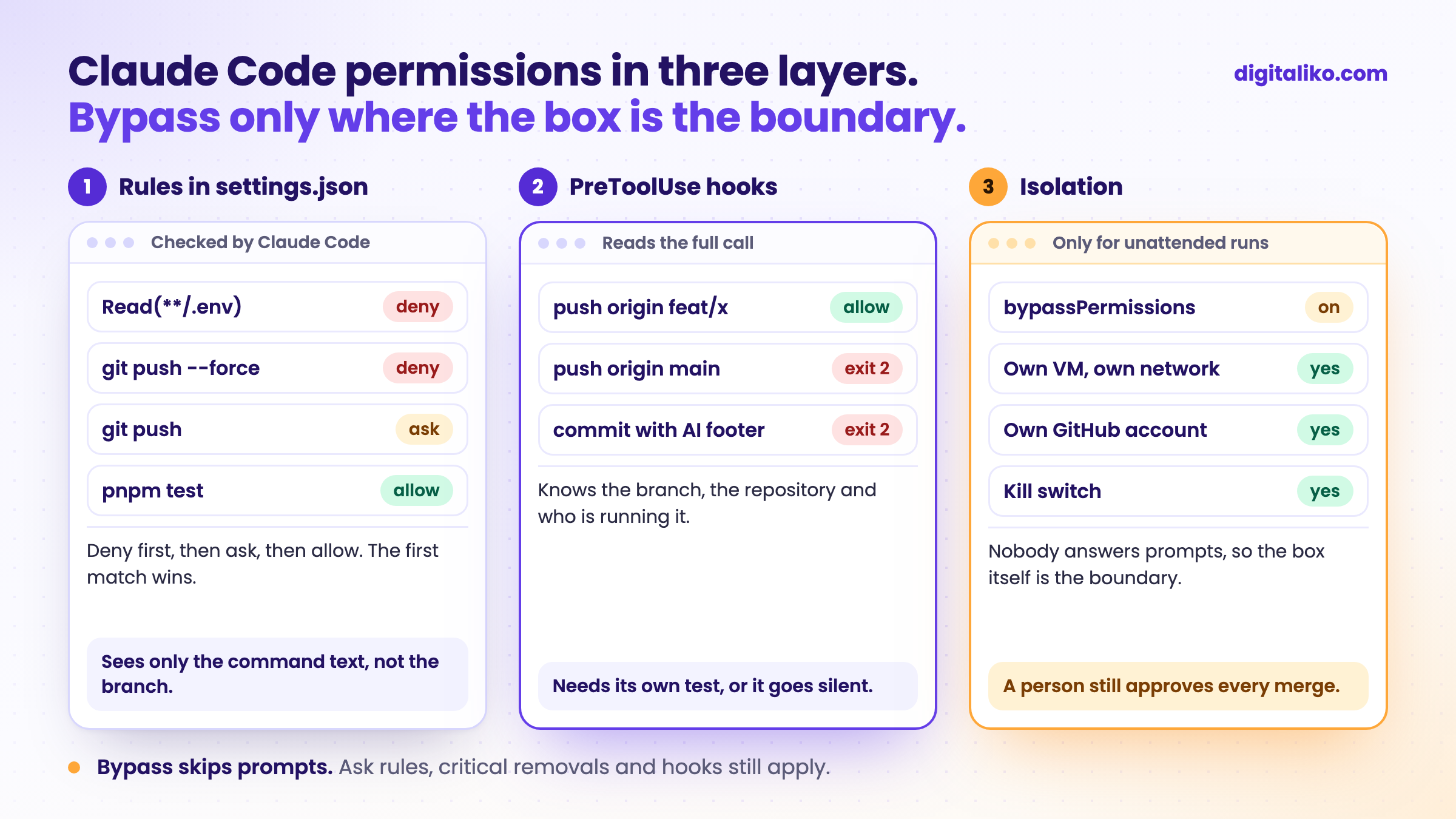
The hook needs its own test, or it can go silent. We lost a week to exactly that, described in Claude Code hooks that silently do nothing.
When is skipping permissions actually safe?
When the box itself is the boundary. Our unattended runs build with --permission-mode bypassPermissions and --disallowedTools AskUserQuestion ExitPlanMode, because nobody is there to answer a prompt. What makes that acceptable is not the flag, it is what surrounds it. For the always-on AI agent that works our issues, the setup goes like this:
01
A separate macOS VM
The agent lives in its own virtual machine. Its network sees the internet but not our office network or the host's services.
02
Its own GitHub account
A machine user with write access only to the repositories it is given. No admin, no bypass of branch protection on main.
03
The same hooks as people
The plugin hooks run in every session: the push gate, the attribution block. Bypass skips prompts, not hooks.
04
A kill switch
One command stops the VM. The runbook then revokes its GitHub token and logs out its Claude session.
Even in bypass, the merge stays with a person. The agent opens a pull request, branch protection requires an approval, and the approval is never the agent's.
The CI reviewer is the other extreme. It runs unattended too, but gets an explicit tool list instead of bypass:
claude_args: --allowed-tools "Read,Glob,Grep,Bash(git diff:*),Bash(git log:*),Bash(gh pr diff:*),Bash(gh pr view:*)"
It can read the diff and comment. It cannot edit, push or merge, so there is nothing to bypass.
What about the built-in sandbox?
Claude Code has an OS-level sandbox that limits what shell commands can read, write and reach on the network, including their child processes. It is the right answer to the second blind spot above, because it does not depend on the command text.
Two settings are worth knowing before you roll anything out. permissions.disableBypassPermissionsMode: "disable" in managed settings takes bypass away from everyone. A user can also set it for themselves.
How do you set Claude Code permissions for a team?
Go through what your repositories already have:
The order matters. Deny rules cost nothing and stop the worst cases on day one. The hook comes next. Isolation is only needed once something runs without a person watching.
How these rules sit next to CLAUDE.md and team conventions is covered in Rules for AI code in a team. How the unattended loop takes an issue to a pull request is in Harness engineering in practice.
Want agents that are fast and still cannot break production?
We set up permission rules, hooks, isolation and CI right in a team's repositories as part of AI-native SDLC for development teams. AI writes all of our code today, and a senior is accountable for the result. Since 2023 we have delivered 15+ production projects.
We get back to you within two business days, and together we pick what to fix first.
If you'd rather talk first, book a 15-minute meeting with Filip.
Where would your agent get to today if nobody answered a single prompt?
In short
- --dangerously-skip-permissions is bypassPermissions: no prompts, but ask rules, critical removals and hooks still apply.
- Rules are checked deny, then ask, then allow. Team rules go in the repository's settings.json.
- A rule sees only the command text. A PreToolUse hook sees the branch, the repository and the context.
- Full bypass only in an isolated box with its own accounts, a kill switch and a human approving every merge.
Frequently asked questions
What does --dangerously-skip-permissions do in Claude Code?
It starts the session in bypassPermissions mode, the same as --permission-mode bypassPermissions. Claude Code stops asking before commands, edits and fetches. Explicit ask rules, a few critical removals and tools that need a person still prompt, and hooks still run.
Is Claude Code YOLO mode safe?
Only in an isolated environment. Anthropic says to use bypassPermissions only in containers or VMs where Claude Code cannot cause damage. On a developer laptop with real credentials, use permission rules and hooks instead.
In what order are allow, ask and deny rules evaluated?
Deny first, then ask, then allow. The first match in that order wins, so an allow rule can never carve an exception out of a deny rule, and an ask rule prompts even when a narrower allow rule also matches.
Where do Claude Code permission settings live?
In settings.json files: managed settings for the organization, ~/.claude/settings.json for one person, .claude/settings.json in the repository for the team and .claude/settings.local.json for local overrides. Managed settings win, and a deny from any level beats an allow from any other.
How do I stop developers from using bypass mode?
Set permissions.disableBypassPermissionsMode to "disable", ideally in managed settings, where nobody can override it.
Ask AI about this article
The AI also draws on our other articles and experience from real projects.
ChatGPTClaudePerplexity