Playwright MCP: let the AI agent prove it works
For CTOs and engineersHarness and checks · Updated

Filip PapranecFounder, Digitaliko
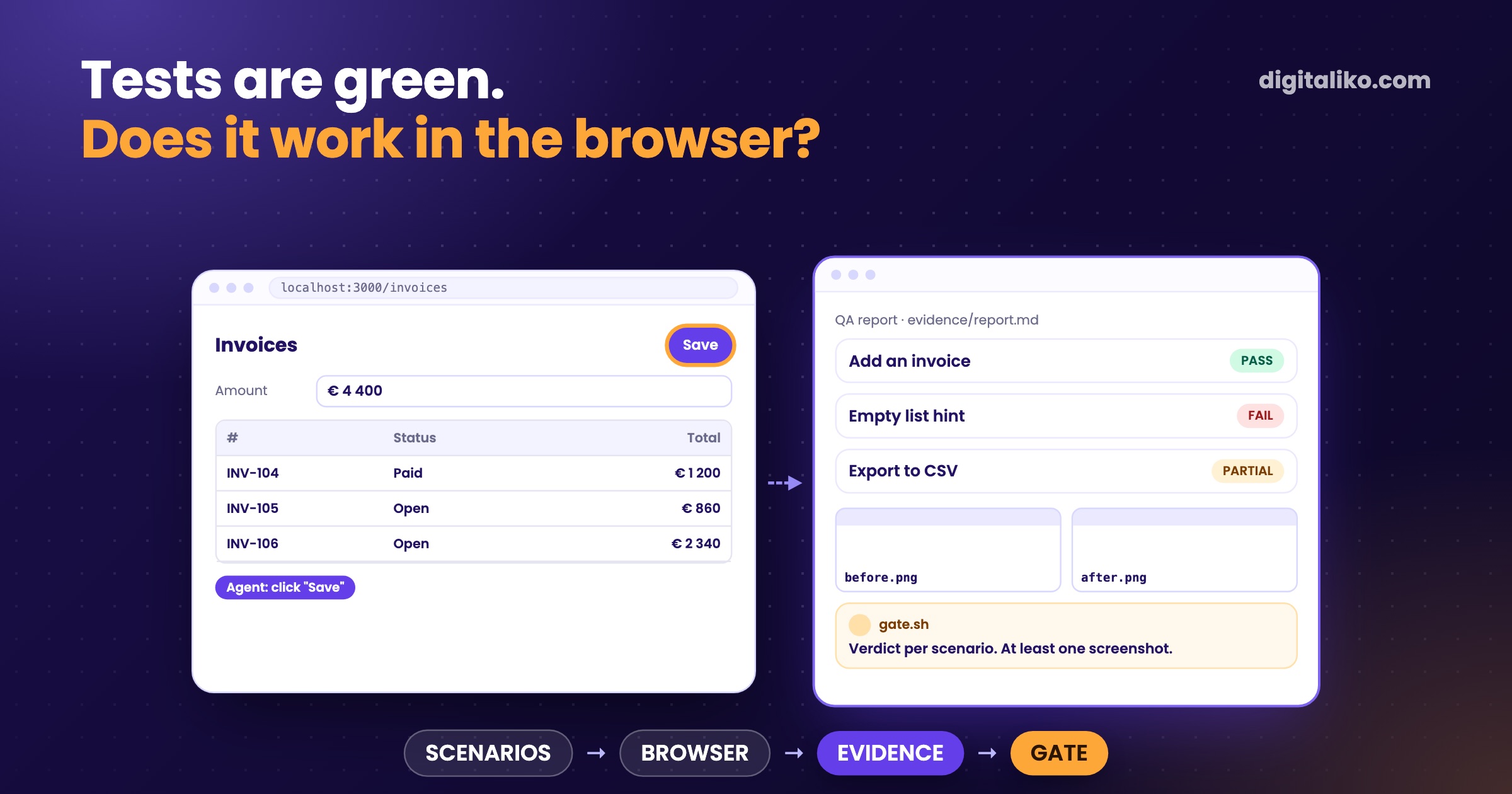
Playwright MCP is an MCP server from Microsoft that gives an AI agent a real browser: it opens pages, clicks, types and reads what is on the screen. We use it for one job. Before anyone says "done", the agent walks the change in the running app and hands back PASS or FAIL per scenario, with screenshots.
A green typecheck proves that the code compiles. A passing component test proves that the component renders in its own harness. Neither proves that the real page, with real data, does what the issue asked for. That gap is what the browser check closes.
The hardest step is usually the last one. Checking that it really works, end to end.

What is Playwright MCP and how does it work?
MCP, the Model Context Protocol, is how an agent like Claude Code gets extra tools. The Playwright MCP server adds browser tools built on Playwright: navigate, click, type, fill a form, read the console and the network requests, take a screenshot.
In Claude Code it is one command:
claude mcp add playwright npx @playwright/mcp@latest
The detail that matters: the agent does not look at pixels. In the words of the README, it works "through structured accessibility snapshots, bypassing the need for screenshots or visually-tuned models". The agent gets the page as a tree of buttons, links, headings and form fields with their labels. It clicks the button called "Save", not the point at the coordinates where a button used to be.
Two side effects follow. A page whose buttons have no accessible name is hard for the agent too, so the check doubles as a small accessibility review. And the agent can still take a screenshot when a person needs to see the result.
By default the server keeps a persistent browser profile, so a login survives between sessions. For runs that must start clean there is --isolated, and --storage-state loads saved cookies into that clean context.
How do we make the agent check its own change?
The method lives in our browser-qa skill. It changes no app code. It writes evidence:
01
Scenarios from the issue
One scenario per acceptance criterion or feedback item, each traced to its source. Concrete steps: click X, then Y happens.
02
Real data, real login
A run over mock or empty data proves the layout, not the behaviour. A person logs in first. The agent never touches the session token.
03
Walk the app
Navigate, click, type, take a screenshot. Anything that must be exact, a colour, a number, a label, is read from the page, not guessed from a picture.
04
Verdict per scenario
PASS, FAIL or PARTIAL, with what was actually seen. Never "looks right".
05
File the fails
Every real FAIL becomes a bug issue that links the report. A note in the report alone gets lost.
The skill also says what to do when automation cannot do something. An element nested so deep that a click does not fire reliably gets the note "needs manual click". It is not silently marked FAIL, and it is not skipped.
Not every check comes from a written scenario. Sometimes the best one is open-ended:
One trick works well for us. We send an agent into the feature as a type of customer, a persona, and let it explore on its own.
A persona walk finds the things nobody wrote down: a confusing label, a dead end, a step that only makes sense if you built it.
What does the agent hand back, and who checks it?
A report the agent writes about itself is still a claim. So the shape of the evidence is fixed, and a script checks it, not a model.
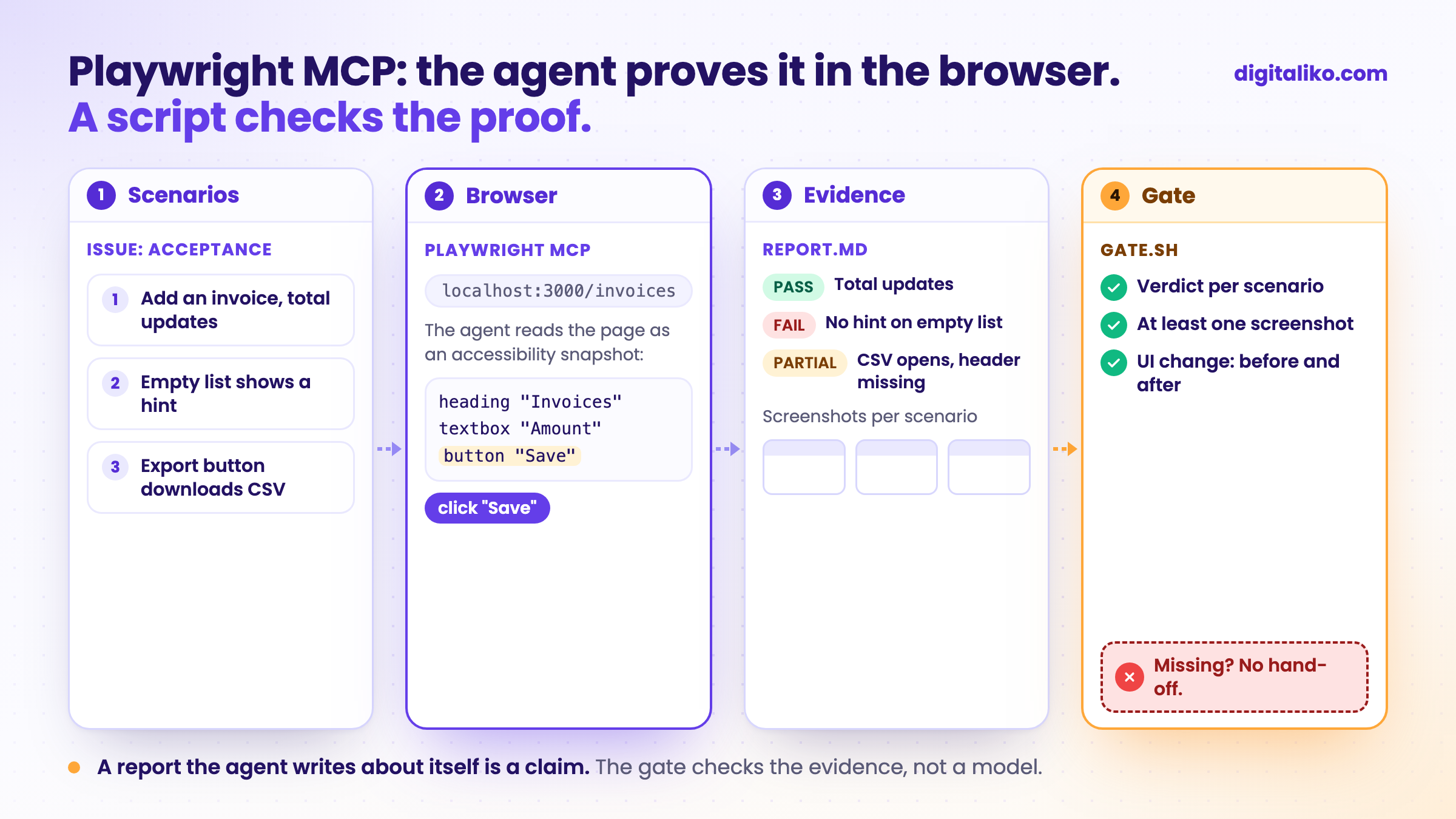
In our agent loop a QA task tells the agent to use the Playwright browser tools and to save everything in evidence/<issue>/: a screenshot per scenario, the console and network errors, and report.md. Then gate.sh, a plain bash script with exit codes, does the rest:
n=$(grep -cE '\b(PASS|FAIL|PARTIAL)\b' "$tree/$rep"); shots=$(ls "$tree/$(dirname "$rep")"/*.png 2>/dev/null | wc -l | tr -d ' ')
[ "$n" -gt 0 ] && [ "$shots" -gt 0 ] || { echo "FAIL: report needs PASS/FAIL per scenario and screenshots" >> "$out"; exit 1; }
No report, no verdict lines or no screenshot means the task is not done, whatever the agent says.
Code tasks have a similar rule. When a pull request changes UI files, the loop wants a before-*.png and an after-*.png. If there is a good reason for none, the PR has to say so in a line that starts with No screenshots:. The reviewer then sees the change instead of imagining it.
That rule came from a bug of our own. Before the fix, any PNG counted as proof, so one screenshot of anything was enough. Now there have to be two, and they have to be named for what they show.
What does a browser check catch that unit tests miss?
A unit test asks a narrow question in a controlled room. The browser asks whether the room exists at all.
| Question | Unit or component test | Agent in a real browser |
|---|---|---|
| Does the function return the right value? | Yes, fast and repeatable | Only indirectly |
| Is the route wired to the component? | No, the test mounts the component itself | Yes, it opens the real URL |
| Does it work with production-like data? | Only with the fixture you wrote | Yes, if it runs on real data |
| Does the button have a name a screen reader can use? | Only if someone wrote that test | Yes, the snapshot shows it |
| Are there console or network errors? | Rarely checked | Yes, both are read |
| Does the flow make sense to a customer? | No | Partly, with a persona walk |
Both columns matter. The red-green rule for unit tests is in Red-green TDD with AI agents. The browser check sits on top of it, not instead of it.
To be honest about the limits: we have not counted how many bugs the browser checks catch compared with the tests. What we know is the kind: things that only exist when everything is wired together.
Playwright MCP, Playwright scripts or Chrome DevTools MCP?
Even the Playwright team says the MCP is not always the right tool. Their README recommends the Playwright CLI with skills for coding agents, because it is "more token-efficient". MCP, they write, "remains relevant for specialized agentic loops", such as exploratory automation or long-running autonomous workflows.
That matches what we see:
Playwright MCP
- The agent explores and decides the next click itself
- Good for checking one change once, and for persona walks
- Costs context: tool schemas and page snapshots
For anything you repeat
Playwright scripts and tests
- Same check on every run, in CI
- Exact numbers: computed colours, sizes, timings
- Someone has to write them first, often the agent
Chrome DevTools MCP
- Browser tools with DevTools access
- What our interactive QA skill now tries first
- Same method, different driver
When we audited this website this week, we did not use the MCP at all. The agent wrote plain Playwright scripts against a local build: text contrast measured from computed colours, an axe accessibility scan, every page rendered at phone width, and performance with a throttled CPU. Those are checks we want to run again after every change. A script does that the same way each time. An agent improvising clicks does not.
And since this week our interactive browser-qa skill tries Chrome DevTools MCP first when a session has it. The method did not change at all. The browser driver is the replaceable part.
Where does it go wrong?
A few traps we know, either from our rules or from our own mistakes:
- Mock data. A green walk over an empty database proves the layout, nothing else. The skill forbids calling it done.
- The session token. Playwright MCP has tools that read cookies and local storage. Our rule is older than any tool: the agent never extracts, logs or passes on a session token.
- Eyeballing. "The total looks right" on a screenshot is a guess. The agent reads the value from the page instead.
- Two agents, one profile. A persistent profile can be used by one browser at a time. Parallel runs need
--isolatedor their own profile directory.
What are Playwright agents, and do we use them?
Playwright agents, officially Playwright Test Agents, are three agent definitions that ship with Playwright itself. In the words of the Playwright docs (as of 2026-10-24): the planner "explores the app and produces a Markdown test plan", the generator "transforms the Markdown plan into the Playwright Test files", and the healer "executes the test suite and automatically repairs failing tests". For Claude Code you add them with one command:
npx playwright init-agents --loop=claude
The planner starts from a seed test, tests/seed.spec.ts, that sets up the environment, and writes the plan to specs/. The generator turns the plan into tests in tests/ and checks selectors and assertions live while it walks the scenarios.
To be honest: we have not used Playwright agents in our projects yet. Our agents write Playwright tests from the issue's acceptance criteria inside our own loop, and the browser-qa skill does the exploring. The planner and the generator do much of the same in Playwright's own format, so they are worth trying in a team that has no loop of its own.
The healer is the one we would watch. The docs say its output is "a passing test, or a skipped test if the healer believes that functionality is broken". In our loop a skipped test proves nothing, and a test that is red because the product broke has to stay red. If you try the healer, review every locator or assertion it changes like any other pull request.
Is your team ready to let an agent check in the browser?
Go through what you already have:
If you want a ready base, our public Claude Code production starter already runs a Playwright smoke test in CI and uploads the report when it fails. How the whole loop around it works is in Harness engineering in practice: from issue to PR.
Want agents that prove their work in your repository?
We set up browser checks, evidence rules and the CI around them right in a team's repository as part of AI-native SDLC for development teams. Is your team short of hands rather than process? See a senior developer for your team. AI writes all of our code today, and a senior is accountable for what reaches production. Since 2023 we have delivered 15+ production projects.
We get back to you within two business days, and together we pick what to fix first.
If you'd rather talk first, book a 15-minute meeting with Filip.
Who in your team checks today that a change works in the browser, and how do they prove it?
In short
- Playwright MCP gives an agent a real browser that it reads as an accessibility snapshot.
- We have the agent walk scenarios from the issue on real data and hand back PASS or FAIL with screenshots.
- A script, not a model, blocks the hand-off when the report or the screenshots are missing.
- Explore with the MCP. Turn checks you repeat into Playwright tests in CI.
Frequently asked questions
What is Playwright MCP?
An MCP server from Microsoft that gives an AI agent browser tools built on Playwright: open a page, click, type, fill a form, read the console and network requests, take a screenshot. The agent reads the page as an accessibility snapshot, not as pixels.
How do I add Playwright MCP to Claude Code?
Run claude mcp add playwright npx @playwright/mcp@latest. Other MCP clients use the same server with the config command npx and the argument @playwright/mcp@latest.
Does Playwright MCP replace end-to-end tests?
No. The MCP is for exploring and for checking one change once. A check you want on every pull request belongs in a Playwright test or script that runs in CI, where nobody has to ask an agent.
How does the agent test pages behind a login?
A person logs in first, in the browser the agent uses, and the agent works in that session. Our rule: the agent never reads, logs or passes on the session token. For isolated runs Playwright MCP can load a saved storage state.
Is a QA report from an agent enough to call a change done?
Only with evidence: a verdict per scenario and the screenshots next to it. In our loop a gate script blocks the hand-off when the report or the screenshots are missing, and a person still reviews the pull request.
Ask AI about this article
The AI also draws on our other articles and experience from real projects.
ChatGPTClaudePerplexity