Claude Code plan mode: when is it enough for a team?
For CTOs and engineersHarness and checks · Updated

Filip PapranecFounder, Digitaliko
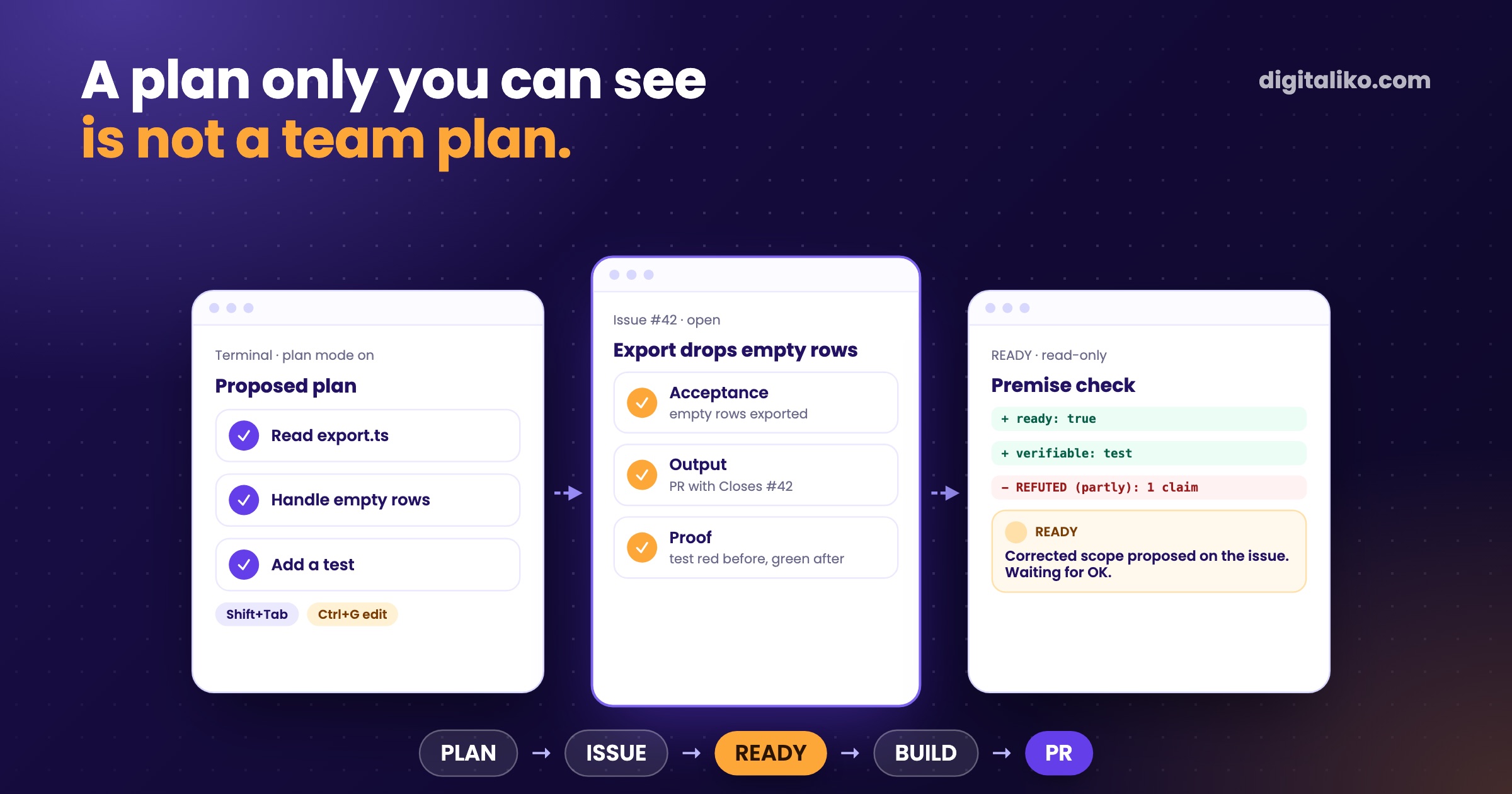
Claude Code plan mode makes Claude explore the code and propose a plan before it edits anything. You approve the plan, and only then do edits start. For one developer in one session that is often enough. In a team it is not, because the plan lives in one session on one laptop, and nobody else can review it or check it later.
So we use plan mode to draft and keep the plan where the team works: in the GitHub issue, with acceptance criteria a reviewer can answer yes or no. Before our agent builds anything, a read-only check tests the issue's premise against the code.
How does Claude Code plan mode work?
Plan mode is one of the permission modes. According to the permission modes docs, Claude reads files, runs shell commands to explore and writes a plan, but does not edit your source until you approve. The flow:
01
Enter plan mode
Shift+Tab, /plan in front of one prompt, or claude --permission-mode plan.
02
Claude explores
It reads files and runs read-only commands. Edits stay blocked.
03
It proposes a plan
Ctrl+G opens the plan in your editor, so you can change it directly.
04
You decide
Approve with auto mode, approve with manual edits, or keep planning.
Approving switches the session out of plan mode, and Claude starts editing. The plan file is saved in ~/.claude/plans/ unless you set plansDirectory.
Anthropic's own cost guide recommends plan mode for complex tasks, because a wrong direction found before the edits is cheaper than one found after.
Where does plan mode fall short in a team?
Plan mode answers "does Claude understand what I want right now". A team needs answers to three more questions:
- Who else saw the plan? It lives in one session. A colleague who picks up the work tomorrow, or the reviewer of the pull request, never sees what was agreed.
- Was the premise true? The plan is built on what the developer typed. If the issue says "the export drops empty rows" and the code already handles them, the plan fixes a bug that does not exist.
- How will we know it is done? A plan lists steps. A reviewer needs criteria, ideally each one proven by a test.
Plan mode
- Lives in one session, saved on one machine
- Built on what the developer typed
- Approved by the person at the keyboard
- Lists steps to take
- Great for exploring before a change
What we use in a team
Plan in the issue
- Lives in the GitHub issue the whole team reads
- Premise checked against the code before work starts
- Reviewed by whoever reviews the PR
- Lists criteria a reviewer can answer yes or no
- Survives the session, the branch and the person
They are not rivals. Plan mode is a good way to write the issue.
How do we plan instead?
Every task is a GitHub issue with a type and a required output:
| Type | Output that must exist |
|---|---|
| code | A PR with Closes #N, a test that fails before and passes after, the repository's scripts green |
| research | A markdown file plus a claims file: every claim with a source URL and a verbatim quote |
| qa | A report with PASS or FAIL per scenario, plus screenshots |
| doc | The markdown file, links alive |
The issue says what to deliver. Whoever picks it up, a person or our AI agent, fills a missing output or acceptance as a stated assumption instead of guessing silently.
What does the READY check look like?
Before our agent loop builds anything, it runs a READY step. It is not plan mode. It is a separate, read-only call with a typed answer:
claude -p "$(cat ready.md; cat issue.md)" \
  --permission-mode default --permission-prompts none \
  --tools "Read,Grep,Glob,WebFetch" \
  --json-schema "$(cat ready.schema.json)" --output-format json --max-turns 40
The schema forces the answer into fields: ready, done_when (criteria a reviewer can say yes or no to), verify (how each one is proven), understood, premise, and verifiable, which is test or human. No valid object back counts as a failure, never as a default.
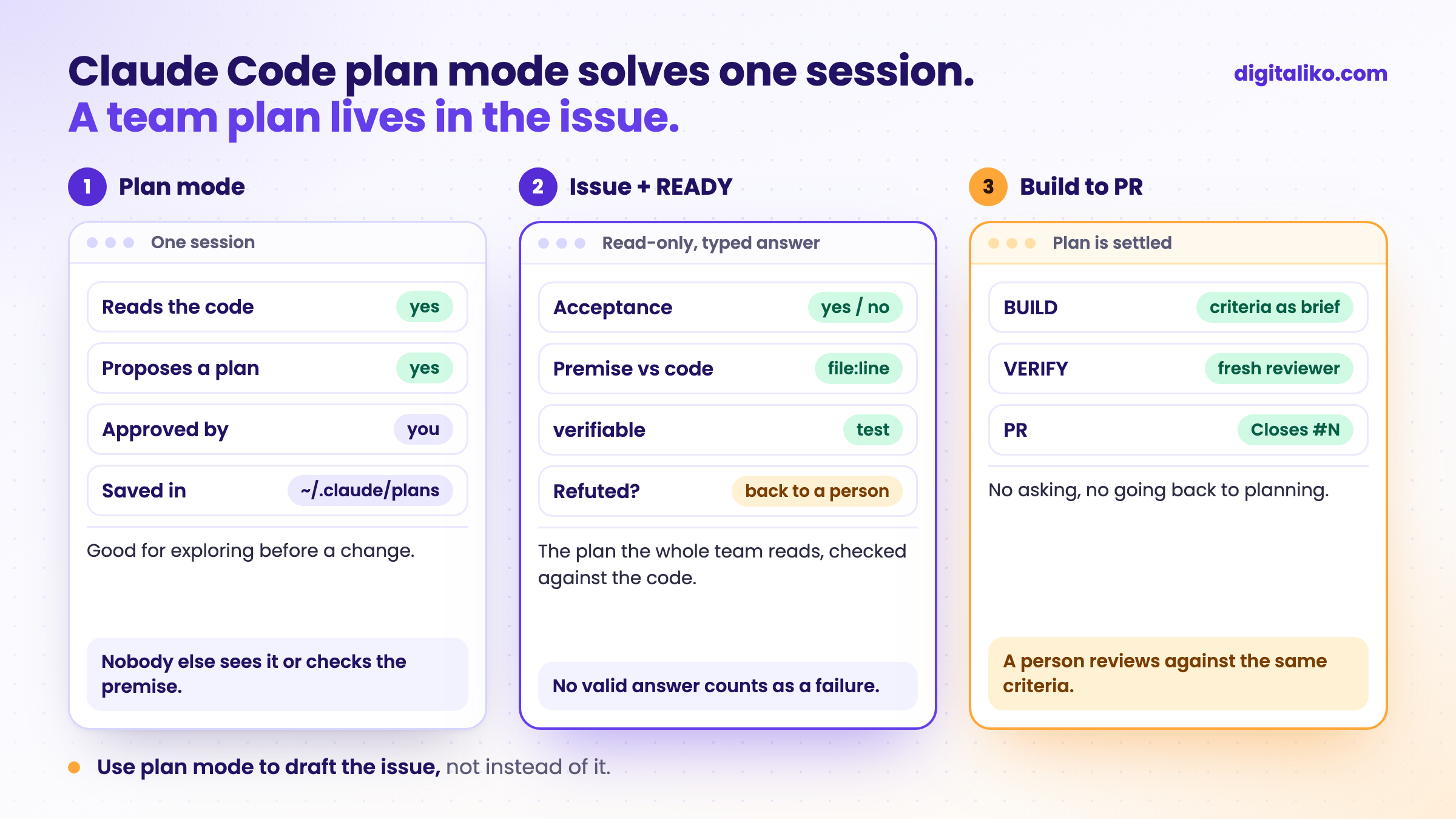
The build session then gets those criteria as its brief. It runs with --disallowedTools AskUserQuestion ExitPlanMode: by then the plan is settled, so the agent cannot stop to ask or drop back into planning. The full loop, from READY to the pull request, is in Harness engineering in practice.
What does a premise check catch that plan mode does not?
A plan made in good faith on a false premise. The READY prompt tells the model to check every claim the issue makes about current behaviour against the repository and cite file:line. If a claim does not hold, the answer starts with REFUTED: and lists what is no longer true and what still is.
What happens next depends on how much is left:
- Nothing left to do. The issue goes back to a person with the evidence and a proposal to close it.
- Part of it is refuted. The loop proposes the corrected scope on the issue and waits for a person to answer OK before any build.
- Only a person can verify it. When
verifiableishuman, the agent says what someone has to look at before it starts.
We made that mistake ourselves. We designed the agent one way, and the real scenario turned out to be different.

That is the gap a premise check closes. Planning is cheap. Planning the wrong thing is the expensive part, and it looks exactly like progress until review.
When is plan mode enough?
Plenty of the time. Use this to decide whether the plan needs to leave the session:
Plan mode fits short, local changes where you are the only reader. Everything else deserves a plan the team can read. How a written spec becomes the contract between people and agents is in Spec-driven development with AI agents.
Want plans that survive the session?
We set up issue contracts, READY checks and the agent loop right in a team's repositories as part of AI-native SDLC for development teams. AI writes all of our code today, and a senior is accountable for the result. Since 2023 we have delivered 15+ production projects.
We get back to you within two business days, and together we pick what to fix first.
If you'd rather talk first, book a 15-minute meeting with Filip.
Who in your team could find yesterday's plan today?
In short
- Plan mode explores and proposes before any edit: Shift+Tab, /plan or --permission-mode plan.
- It solves one session. A team needs a plan others can read, a checked premise and criteria for done.
- We keep the plan in the GitHub issue and run a read-only READY check before building.
- Use plan mode to draft the issue, not instead of it.
Frequently asked questions
What is plan mode in Claude Code?
A permission mode in which Claude reads files and runs exploring commands, then proposes a plan without editing your source. Edits stay blocked until you approve the plan.
How do you turn on plan mode in Claude Code?
Press Shift+Tab to cycle to it, start a single prompt with /plan, or launch the session with claude --permission-mode plan.
Can I edit the plan before Claude starts?
Yes. Press Ctrl+G to open the proposed plan in your editor, or choose to keep planning and tell Claude what to change.
Where does Claude Code save plans?
In ~/.claude/plans/ by default, or in the directory set by the plansDirectory setting. Either way it is on one machine, which is why a team plan belongs in the issue as well.
Is plan mode the same as spec-driven development?
No. Plan mode is a feature of one session. Spec-driven development keeps the plan as a written artifact the whole team reviews and the checks can verify. Plan mode can produce the draft for it.
Ask AI about this article
The AI also draws on our other articles and experience from real projects.
ChatGPTClaudePerplexity