Claude Code pricing for a team: plans, API and agents
For CTOs and engineersCTO decisions

Filip PapranecFounder, Digitaliko
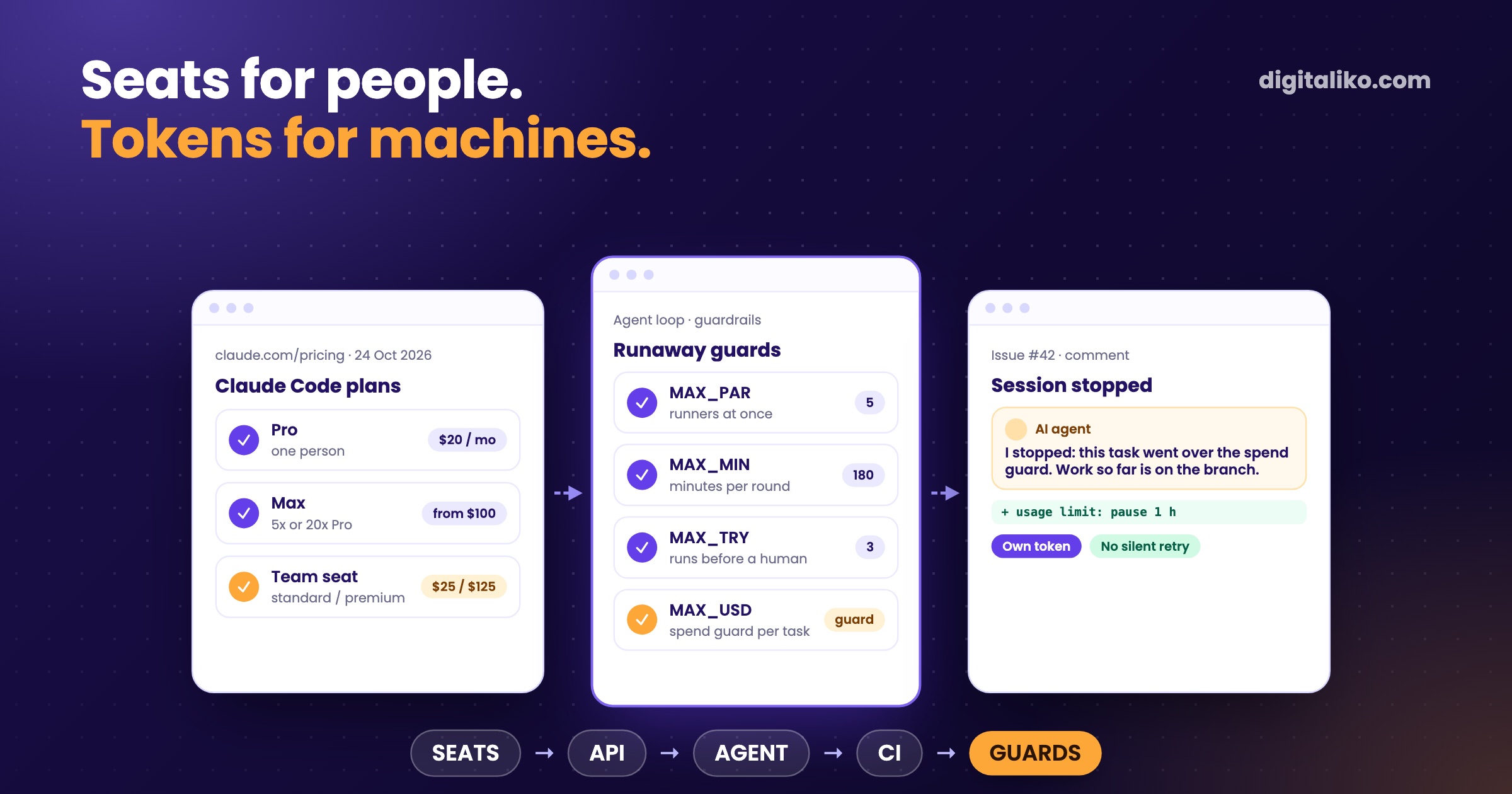
Claude Code pricing comes in two shapes: a seat on a Claude plan, or API tokens. Per Anthropic's pricing page (retrieved 24 October 2026), Pro costs $17 a month billed annually or $20 monthly, Max starts at $100 a month, a Team standard seat is $20 a month billed annually or $25 monthly, and a premium seat with five times the usage is $100 or $125. On the API you pay per million tokens.
For a team the real question is not the price list. It is what runs on which bill: people on seats, an always-on agent on its own token, the CI reviewer on a token or an API key. And what stops a background agent from spending a week of budget in one night.
What does Claude Code cost in October 2026?
Every paid plan includes Claude Code. The free plan does not. US list prices from claude.com/pricing, retrieved 24 October 2026:
| Plan | Price per month | Usage |
|---|---|---|
| Pro | $17 billed annually, $20 monthly | One person, the entry paid plan |
| Max | From $100 | Five or twenty times Pro |
| Team, standard seat | $20 billed annually, $25 monthly | More than Pro, 2 to 150 seats |
| Team, premium seat | $100 billed annually, $125 monthly | Five times a standard seat |
| Enterprise | $20 per seat billed annually, 20 seat minimum | Usage billed separately at API rates |
API list prices for the current models, per million input / output tokens: Opus 5.5 $4 / $20, Sonnet 5.5 $2 / $10, Haiku 5.5 $0.10 / $0.50 for prompts up to 100K tokens. Cache reads are a fraction of that, which matters, because Claude Code re-reads the conversation on every request.
Prices change. Check the page before you budget, and treat the table as the shape, not a quote.
Seats or API for people?
On Team and Enterprise plans, each member's Claude Code usage draws from a seat allowance that resets on a rolling five-hour window and a weekly window, shared with Claude chat. On the API, every token is billed.
Seats (Pro, Max, Team)
- Fixed price per person per month
- Usage resets every five hours and every week
- A limit message pauses work until the reset, or usage credits continue it
- Best for people who work interactively every day
API (Console, cloud providers)
- Pay per token, no ceiling unless you set one
- Workspace spend limits and per-user reports
- Same price whether one person or a script runs it
- Best for automation with uneven volume
A worked example from the list prices: five developers on standard Team seats billed annually cost 5 x $20 = $100 a month. Two of them who run long sessions all day can move to premium seats.
For comparison, Anthropic's cost guide reports API costs across enterprise deployments of around $13 per developer per active day and $150 to $250 per developer per month, with 90 % of users below $30 per active day. That is why most teams that work interactively end up on seats.
Which plan does an always-on agent need?
An agent that works issues in the background is not a developer, and it should not borrow one's session. Ours runs in its own virtual machine with its own token, passed in through the environment and never printed:
# token: $CLAUDE_CODE_OAUTH_TOKEN, else the stored <user>-claude-token (Keychain),
# else the logged-in Claude Code on that machine
claude --bg --permission-mode bypassPermissions --disallowedTools AskUserQuestion ExitPlanMode "$BRIEF"
A subscription token means the agent works inside a usage window like a person. When it hits a limit, the loop has to notice, stop and wait, not retry in a tight loop. Ours looks for the message in every run:
limit() {  # a usage-limit message anywhere in the run: pause the dispatcher, hand the task back
  grep -qiE "usage limit|limit reached|hit your [a-z ]*limit|weekly limit" "$@" || return 1
  touch "$LOG/limit-hit"; handback "I hit the Claude usage limit. I will pick this up again later; nothing is lost."
}
For the next hour the dispatcher starts nothing new.
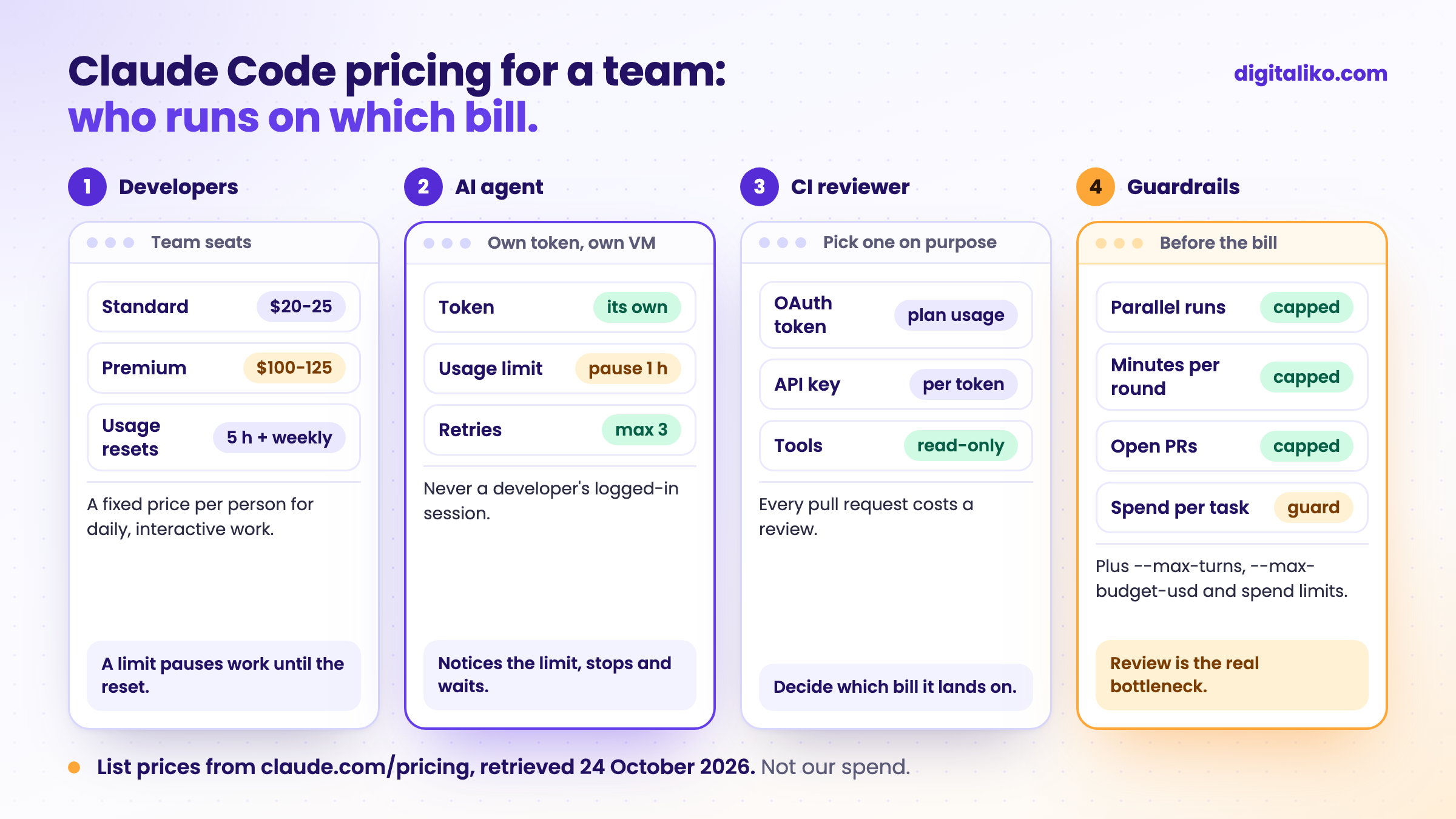
The CI reviewer is the third bill. Our review action passes claude_code_oauth_token, a subscription token, so the reviews draw on that plan. Our public production starter passes anthropic_api_key instead, so every review is billed per token in the Console. Pick one on purpose.
Which guardrails stop a background agent from burning the budget?
A person notices when a session goes in circles. A background agent does not. Our loop has five limits, all plain variables at the top of the script:
MAX_PAR=${MAX_PAR:-5}     # runners at once
MAX_MIN=${MAX_MIN:-180}   # minutes per BUILD round; a stuck guard, VERIFY judges the work
MAX_TRY=3                 # runs of one issue before a human looks
MAX_OPEN=${MAX_OPEN:-3}   # ready PRs waiting for people; no NEW task above this
MAX_USD=${MAX_USD:?cap}    # API-equivalent spend per task; a runaway guard, not a budget
The last one is the interesting one. Even on a subscription, the loop computes what the task would cost at list API prices from the session transcripts, and stops the session when it crosses the guard:
01
Every 30 seconds
The runner checks the build session's state and its API-equivalent spend so far.
02
Over the guard
It stops the session. The work so far stays on the branch.
03
Hands it back
A comment on the issue says how much it used and asks a person to continue, change course or take over.
04
No silent retry
The task waits for that answer. Nothing restarts it on its own.
MAX_OPEN is the one people miss. Review is the real bottleneck, so an agent that opens ten pull requests nobody reads is spending money on a queue, not on progress.
On the Anthropic side you have more brakes: --max-turns and --max-budget-usd per headless run, workspace spend limits in the Console, and spend limits per organization, group or member on Team and Enterprise once usage credits are on.
With AI we burn tokens faster than a startup burns its runway.

How do you cut Claude Code token usage?
Most of the bill is context. Claude Code sends the conversation with every request, so a long session costs more per question than a fresh one. Anthropic's cost guide lists what helps, and these are the ones we use:
/usage shows where it went, broken down by skills, subagents and MCP servers, with recommendations. Run it before you buy more seats.
Why no spend numbers from us?
Because a bill without its context misleads more than it helps.
How the rest of the agent setup holds together, permissions and hooks included, is in Claude Code best practices for a team. The loop that the guardrails sit in is in Harness engineering in practice. If you are still choosing the tool, the comparison is in Cursor vs Claude Code.
Want agents that ship without surprise bills?
We set up seats, tokens, agent loops and their guardrails right in a team's repositories as part of AI-native SDLC for development teams. AI writes all of our code today, and a senior is accountable for the result. Since 2023 we have delivered 15+ production projects.
We get back to you within two business days, and together we pick what to fix first.
If you'd rather talk first, book a 15-minute meeting with Filip.
What would stop your agent tonight if it started going in circles?
In short
- Claude Code comes with every paid plan: Pro from $17, Max from $100, Team seats from $20, Enterprise $20 plus API usage (list prices, 24 October 2026).
- People who work daily fit seats. Automation with uneven volume fits the API and its spend limits.
- An always-on agent gets its own token and pauses on a usage limit. The CI reviewer runs on a token or an API key, chosen on purpose.
- Cap background agents by parallel runs, time, retries, open PRs and spend per task.
Frequently asked questions
How much does Claude Code cost?
Claude Code is included in every paid Claude plan. Per Anthropic's pricing page (October 2026): Pro $17 a month billed annually or $20 monthly, Max from $100 a month, Team $20 or $25 per standard seat and $100 or $125 per premium seat, Enterprise $20 per seat with usage billed at API rates. On the API you pay per token.
Is Claude Code free?
No. The free Claude plan does not include Claude Code. You need Pro, Max, a Team or Enterprise seat, or API credits.
What does Claude Code cost per developer on the API?
Anthropic reports an average of around $13 per developer per active day and $150 to $250 per developer per month across enterprise deployments, with 90 % of users below $30 per active day. Your number depends on the model, the codebase and how many sessions run at once.
Should a team use Team seats or the API?
Seats for people who work interactively every day: a fixed price per month and a usage window. The API for automation with unpredictable volume, where you want per-token billing and workspace spend limits.
How do I stop a Claude Code agent from running up costs?
Cap it in several places: --max-turns and --max-budget-usd per run, a time limit per session, a limit on parallel runs, a pause after a usage-limit message, and spend limits in the Console or the Team admin settings.
Ask AI about this article
The AI also draws on our other articles and experience from real projects.
ChatGPTClaudePerplexity