Cursor vs Claude Code: why we build on the terminal agent
For CTOs and engineersAI in the dev team · Updated

Filip PapranecFounder, Digitaliko
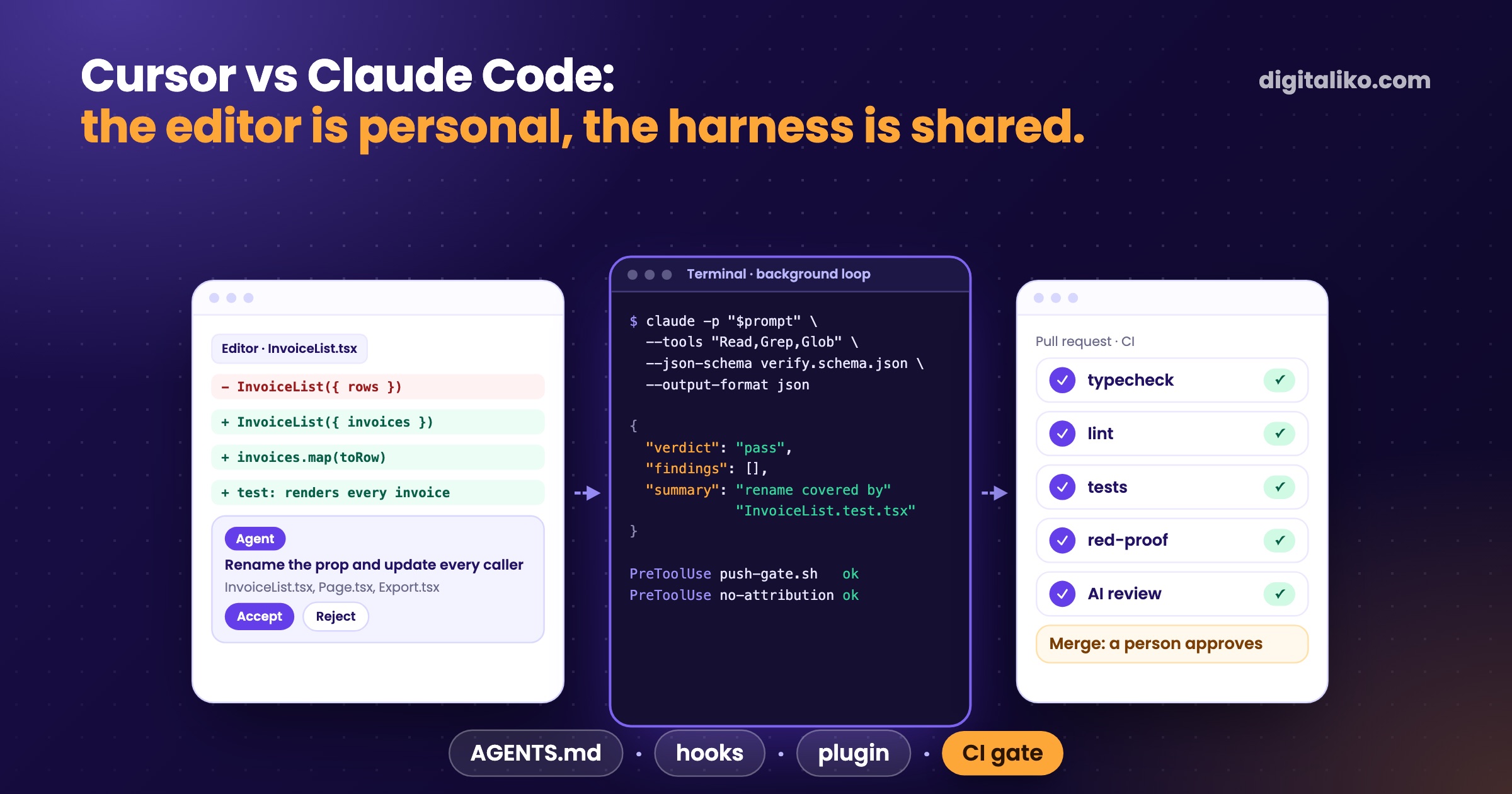
Cursor vs Claude Code is mostly a question of where the agent lives. Cursor is an editor with an AI agent built in. Claude Code is an agent that runs in the terminal, and the same agent runs in CI and in background jobs. For one developer the choice is taste. For a team that wants agents to work without a person at the keyboard, the terminal agent is easier to build checks around, and that is why our whole harness runs on Claude Code.
This is not a benchmark. We did not measure the two tools on the same tasks, and Cursor is not our daily tool. What we can show is what our setup depends on, and where an editor-first tool would still be the better pick for your team.
For months I used Claude Code for tasks it was never built for. And I kept thinking: wow, this way of working really suits me.

Cursor vs Claude Code: what is the actual difference?
Both are AI coding agents. Both read your repository, edit files, run commands and follow a rules file. The difference is the default shape:
| Cursor | Claude Code | |
|---|---|---|
| Where you work | In the editor, the agent sits in a side panel | In the terminal; IDE extensions exist too |
| How you see changes | Inline diffs in the editor | Diffs in the terminal or the IDE, then git |
| Without a person | A CLI with a print mode for scripts and CI | claude -p with typed JSON output |
| Shared rules | .cursor/rules and AGENTS.md | CLAUDE.md, which can import AGENTS.md |
| Review on pull requests | Bugbot | GitHub Action, managed Code Review |
| What we built on it | Nothing yet | Our loop, hooks, plugin and CI review |
Sources for the Cursor column: Cursor CLI ("Use print mode for non-interactive scenarios like scripts, CI pipelines, or automation"), Cursor rules ("Cursor supports AGENTS.md in the project root and subdirectories") and Bugbot. For Claude Code: running it programmatically and Code Review.
So the gap is narrower than most comparison posts suggest. Cursor is no longer editor-only, and Claude Code is not terminal-only. The real question is which one your checks and automation are built on.
Why does our harness run on Claude Code?
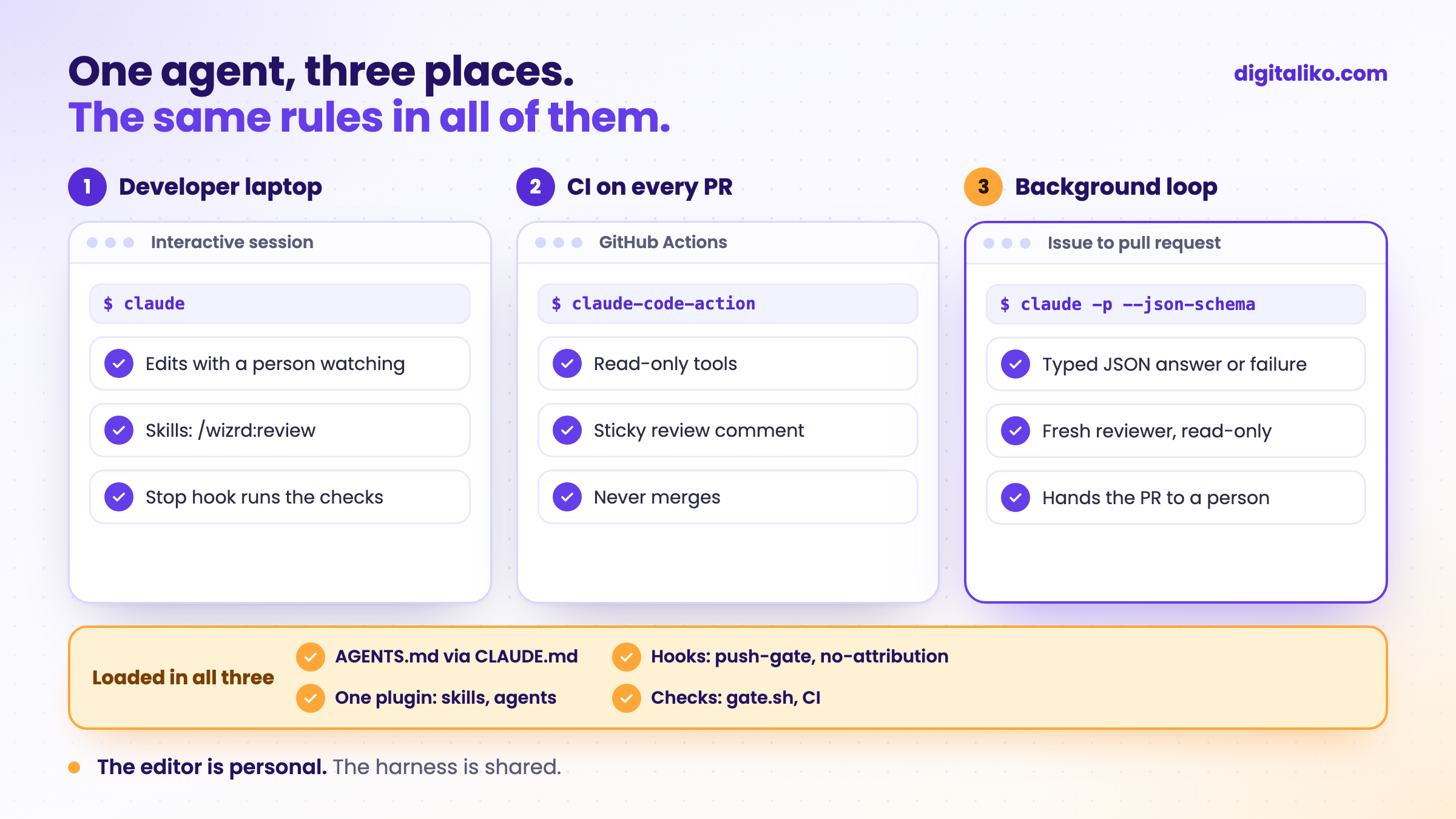
AI writes all of our code today, and a senior is accountable for what reaches production. That only works if the agent runs inside rules it cannot change. Four things in our setup depend on the terminal agent:
- A typed answer from a script. Our agent loop calls
claude -pwith a JSON schema and treats a missing answer as a failure, never as a default. Code decides what happens next, not a chat window. - Hooks below the agent. Before every shell command, hooks block pushes to main and any AI attribution in commits and PRs. The agent cannot edit them.
- One plugin in every repository. Our skills, agents and hooks ship as one Claude Code plugin, enabled in each repository's settings, so a session in a client repository gets the same tools as one in ours.
- The same reviewer in CI. A reusable GitHub Action runs Claude Code review on every pull request, in every repository, with read-only tools.
The call at the heart of the loop, shortened:
claude -p "$prompt" --tools "Read,Grep,Glob" \
  --json-schema "$(cat verify.schema.json)" --output-format json
The same agent, the same rules file and the same hooks run on a laptop, in CI and in the background loop. That is the property we would lose by moving to an editor-first setup, and it is the reason we have not.
Does the choice of editor matter for a team?
Less than the time spent comparing them. In one development team we ran a workshop with, the plan was to pick a tool first, then a method, then oversight. Months later the developers were already working with agents and the comparison was forgotten. What nobody had was anything shared: rules, checks, review.
Nobody stopped to think about how to build the software factory that then builds the product.
That is the part that compounds. A rule in one person's editor settings helps one person. A check in CI helps everyone, whatever they type in.
When is Cursor the better pick?
Honestly, in more cases than a Claude Code shop usually admits:
- People who think in the editor. If your developers want to see every change inline and accept it hunk by hunk, Cursor fits that habit. Forcing a terminal on them costs more than it saves.
- Small, visual changes. Tweaking a component while looking at it is a natural fit for an editor with an agent panel.
- A team that will not automate yet. If agents will only ever run while someone watches, the headless advantage does not matter to you.
Claude Code wins when the agent has to run without a person: in CI, on a server, in a loop that takes an issue and hands back a pull request. If that is where you are heading, build the harness first and let the editor be a personal choice.
How do you choose for your team?
Don't run a tool contest. Run a week with the parts that stay, whatever tool wins:
01
Write the shared rules once
Put them in AGENTS.md. Cursor reads it, Claude Code loads it through a one-line CLAUDE.md.
02
Move the important rules into checks
Tests, types, lint and a CI job that blocks the merge. A sentence in a rules file is a request.
03
Pick one real task
From the backlog, with a clear done condition. Not a demo.
04
Decide what runs without a person
If anything should run in CI or in the background, that part needs a headless agent and hooks.
The public Claude Code production starter has this layer ready: AGENTS.md read by Claude Code, Codex and Cursor, hooks, a Stop hook and a CI gate with red-proof tests. MIT licensed. Why rules alone are not enough is in Rules for AI code in a team, and the loop we run on top is in Harness engineering in practice.
Is your team ready for agents without a person at the keyboard?
A quick self-test, whatever editor you use:
Want this set up in your repositories?
We build the shared layer right in a team's repository as part of AI-native SDLC for development teams: rules, hooks, checks, AI review and, when it fits, a loop that takes issues to pull requests. Your developers keep their editors. Is your team short of hands rather than rules? See a senior developer for your team. Since 2023 we have delivered 15+ production projects.
We get back to you within two business days, and together we pick what to fix first.
If you'd rather talk first, book a 15-minute meeting with Filip.
Which of your rules would still hold if someone switched editors tomorrow?
In short
- Cursor is an editor with an agent inside. Claude Code is an agent that also runs in CI and in background jobs.
- For one developer it is taste. For agents without a person at the keyboard, the terminal agent is easier to wrap in checks.
- Our loop, hooks, plugin and CI review all run on Claude Code. We did not benchmark the two.
- Let people keep their editor. Put the shared rules in AGENTS.md and the important ones in CI.
Frequently asked questions
Is Cursor or Claude Code better?
Neither in general. Cursor is an editor with an agent built in and suits people who want to see and accept changes inline. Claude Code is an agent that runs in the terminal, in CI and in background jobs. For a team that wants agents working without a person at the keyboard, the second shape is easier to build a harness around.
Can Cursor run in CI like Claude Code?
Yes, Cursor has a CLI with a print mode for scripts and CI pipelines. We have not built on it. Our harness, hooks, plugin and review action all use Claude Code, so that is what we can speak to from practice.
Can one team use both Cursor and Claude Code?
Yes. Put the shared rules in AGENTS.md, which Cursor reads and Claude Code loads through a one-line CLAUDE.md. Put the checks that matter in CI and branch protection, where they apply to every tool and every person.
Why does Digitaliko use Claude Code?
Because the same agent runs on a laptop, in CI and in our background loop, with typed JSON answers, hooks the agent cannot edit and one plugin loaded in every repository. AI writes all of our code today, so the harness around the agent matters more to us than the editor.
Does switching from Cursor to Claude Code improve AI code quality?
Not by itself. Quality comes from the checks around the agent: tests that fail first, types, lint, a reviewer that did not write the code and a person who merges. Switching tools without those only changes where the mistakes are made.
Ask AI about this article
The AI also draws on our other articles and experience from real projects.
ChatGPTClaudePerplexity