Claude Code subagents and worktrees: when to use which
For CTOs and engineersAI in the dev team · Updated

Filip PapranecFounder, Digitaliko
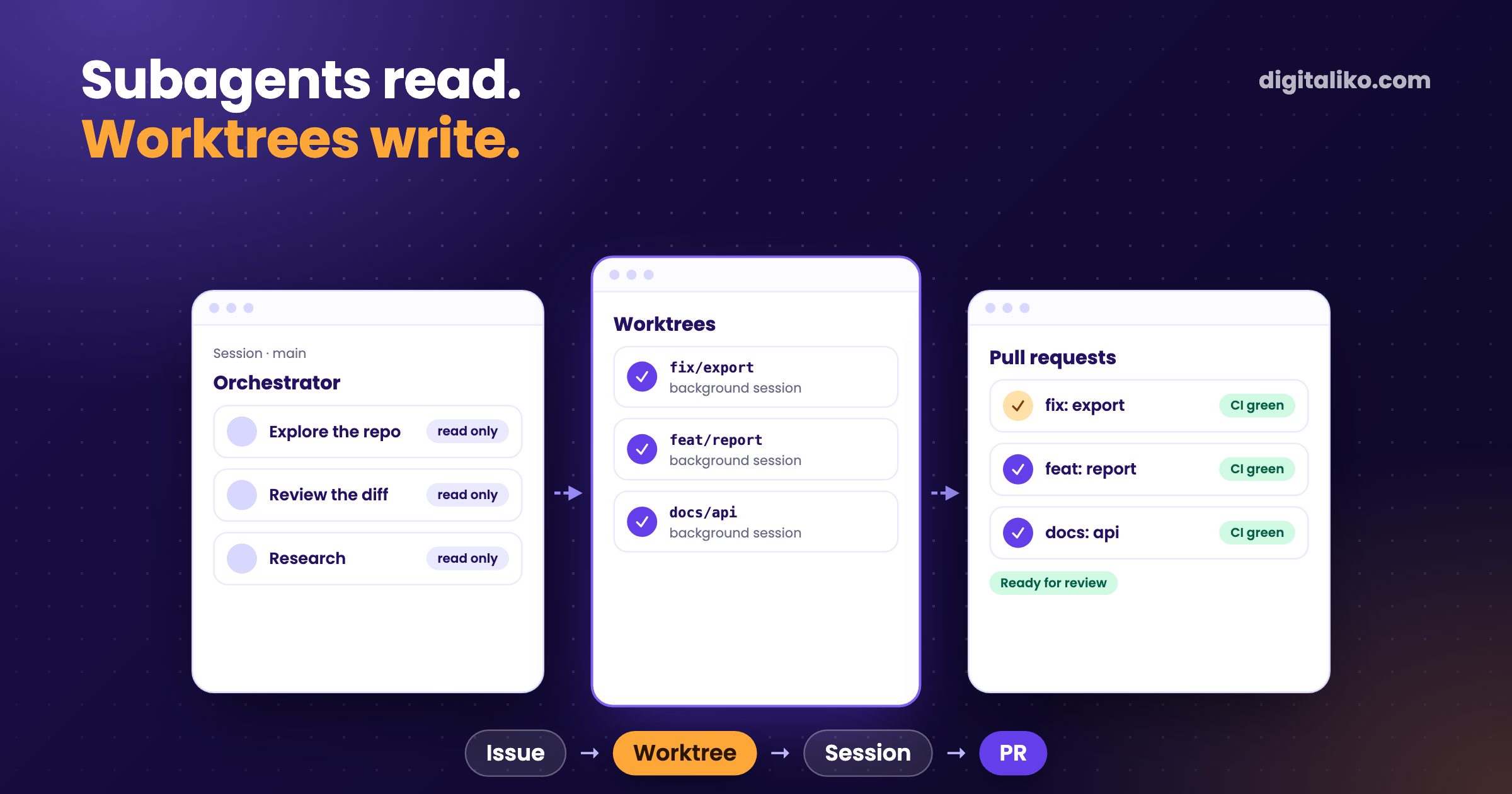
Claude Code subagents split work inside one session. Each runs in its own context window, does one job and returns a summary. Worktrees isolate file edits: each session gets its own copy of the repository and its own branch. Our rule from running parallel agents every day: subagents only read, and every change gets its own worktree, its own session and its own pull request.
AI writes all of our code today, and a senior is accountable for what reaches production. Parallel agents are how several tasks move at once without stepping on each other. Below is when we use which, the command that carries it, and what broke along the way.
What are Claude Code subagents?
A subagent is a helper that Claude starts inside your session. The Claude Code docs put it in one sentence: "Each subagent runs in its own context window with a custom system prompt, specific tool access, and independent permissions."
That is the whole point. The subagent reads a pile of files, and your main conversation gets one paragraph back. You can define your own in .claude/agents/ with a name, a description, its tools and a model. Claude picks one by its description, or you ask for it by name.
The trade-off is that same paragraph. You see what the subagent reports, not what it read. If it missed something, the summary does not say so.
Subagents or worktrees: which one for what?
They solve different problems. Subagents protect your context. Worktrees protect your files. The worktrees docs describe a worktree as "a separate working directory with its own files and branch, sharing the same repository history and remote as your main checkout."
| Subagent | Worktree session | |
|---|---|---|
| Isolates | context | files and branch |
| Lives | inside one session, until it reports | as long as the task, also in the background |
| Good for | exploring, review, research, a long test run | a change that ends as a PR |
| You get back | a summary | a branch, a diff, a pull request |
| Typical risk | a confident summary of a partial read | setup: env files, dependencies, stale branches |
Why do our subagents only read?
We wrote it into the brief every coding session gets:
Only you write code. Subagents only read (explore the repo, run a long test suite and return just the failures).
Writing documents and browser QA have an even stricter line: "Do it yourself, no subagents." Research is the opposite. There the brief scales subagents to the job: one for a single fact, a few for a comparison, one per item for a wide survey. Each writes its findings to a file and returns only the path.
Claude Code can let subagents write. Add isolation: worktree to a subagent and it gets its own temporary worktree. We still keep one writer per task. A reviewer follows one diff and one line of reasoning. Several writers on one task make several diffs that someone has to merge in their head.
How do we run one issue in one worktree?
One task is one worktree, one branch, one Claude Code session and one pull request. The orchestrator session stays on main in the main checkout and never switches branches there. Each change starts with one command of wizrd, our internal Claude Code plugin and CLI (not public):
wizrd task start <repo> "<brief>"
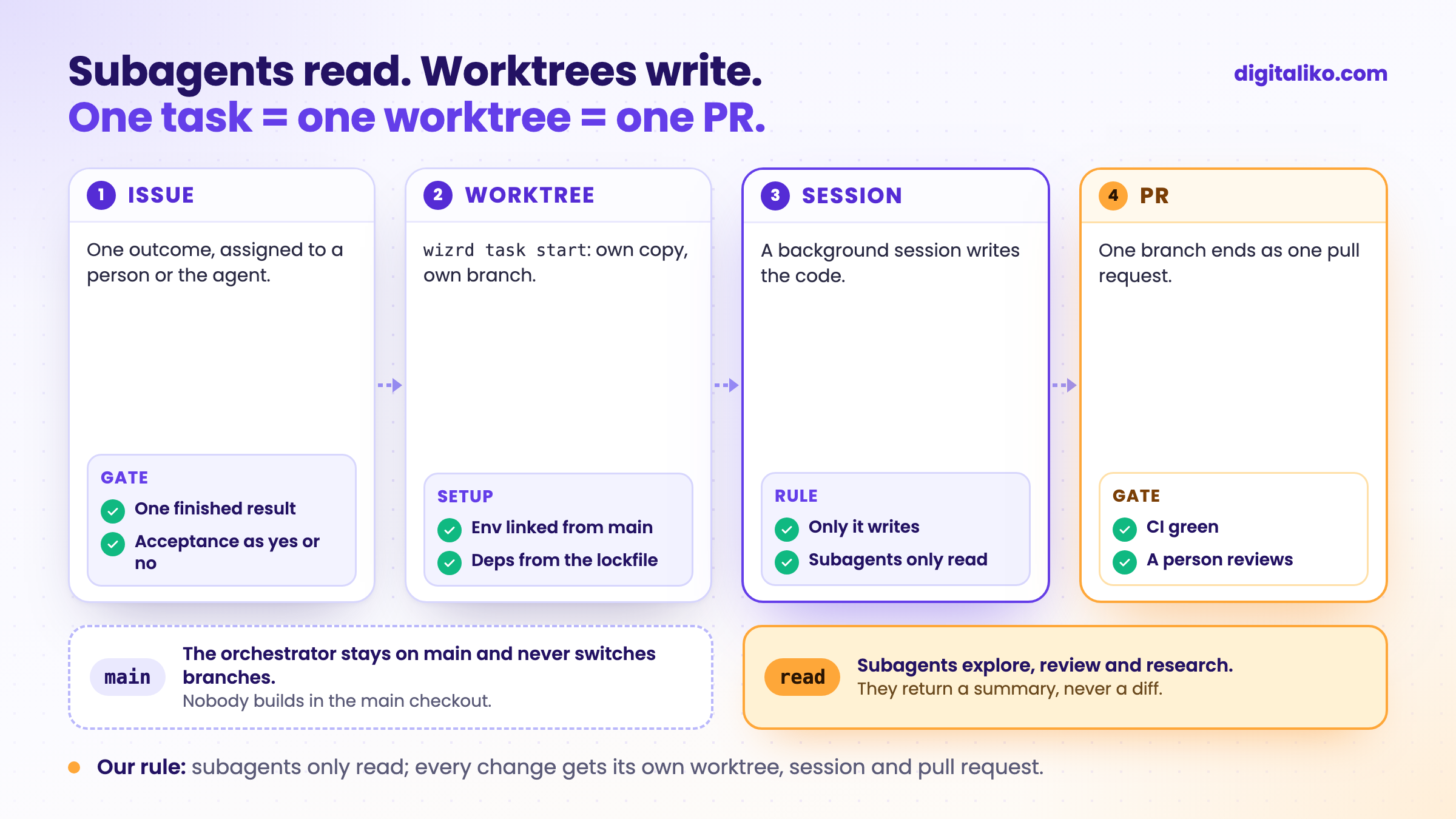
What the command does:
- Worktree.
wizrd worktree newcreates it in one trees directory per machine. Env files are linked from the main checkout and dependencies install from the lockfile. - Context. A service that lives inside a client repository gets a worktree of that repository with the service nested at its submodule path, so every
CLAUDE.mdup the chain loads. Skills and agents of the repositories above come in with--add-dir. - Session. A background
claude --bgstarts in the worktree. We follow it inclaude agentsand message it across sessions when it needs something. - PR. The session commits, pushes and opens a pull request from its branch. After the merge,
wizrd worktree pruneremoves the worktree.
An issue we hand to our AI agent runs the same way, inside the loop described in Harness engineering in practice: from issue to PR. The same worktree code runs on a person's laptop and on the agent's machine. How the agent writes a plan before the work starts is in Claude Code plan mode.
When do subagents waste tokens?
Every subagent starts with a fresh context. It does not see what your main session already read, so it reads it again. Several subagents asked about the same module each read that module from scratch.
The signs we watch for:
- The job is small. One search does not need a helper. The summary costs more than the answer.
- The jobs overlap. "How does auth work" and "where is the session checked" send two subagents into the same files.
- You need the details. A review that has to quote exact lines is better done where those lines stay in context.
The fix is usually fewer subagents, not smarter ones.
Maybe we should simplify something instead. We don't have to keep adding.

Honestly: we do not measure token use per subagent. We track rounds and active time per task, and that is where waste shows up. Where a fan-out clearly pays off for us is wide research with independent questions, and work that would flood the caller. Our meeting debrief skill runs forked (context: fork), so a long transcript never enters the caller's context.
What broke with worktrees?
Isolation is the easy part. Setup is where it breaks. These are the ones worth knowing:
- A resumed task could not get its worktree. Its branch was still checked out in an older trees directory, so
git worktree addfailed. Now the CLI reuses the worktree that already has the branch, and one trees directory per machine is pinned for people and the agent alike. - Env setup was too helpful. It linked env files into empty submodule folders and created placeholder
.envfiles from examples. Now it links only what the main checkout really has. - A task branch moved a submodule pointer. In a repository made of repositories, that quietly changes what everyone else checks out. Now our gate fails any task branch that moves one. Pointers move only through a separate sync.
- Parallel sessions in one checkout. Two sessions switching branches in the same folder destroy each other's uncommitted work. That is why the main checkout stays on
mainand nobody builds there.
The last one is why worktrees exist at all. The first three are why we wrapped them in one command instead of typing git worktree add by hand.
How do you start in your own repository?
You do not need our CLI. Claude Code covers the basics:
01
One worktree per task
claude --worktree <name> creates it under .claude/worktrees/ on a new branch.
02
Ignore and include
Add .claude/worktrees/ to .gitignore. List the env files a fresh checkout needs in .worktreeinclude.
03
Read-only subagents
Give your own subagents read tools only. Writing stays in the task's session.
04
One PR per task
The session pushes its branch and opens one PR. Remove the worktree after the merge.
Then add the checks that make parallel work safe to review: tests, types and a CI gate that must pass on every branch. Hooks that stop dangerous commands are in our public Claude Code production starter. What goes into the rules every session reads is in Rules for AI code in a team.
Is your repository ready for parallel agents?
Review is the real limit. Our dispatcher starts no new agent task while agent PRs wait for people. More parallel agents than reviewers only makes the queue longer.
Want parallel agents in your team's repository?
We set this up in a team's own repository as part of AI-native SDLC for development teams: worktrees, rules, hooks and the checks that make agent PRs reviewable. Short of hands rather than setup? See a senior developer for your team. Since 2023 we have delivered 15+ production projects.
We get back to you within two business days, and together we pick what to fix first.
If you'd rather talk first, book a 15-minute meeting with Filip.
How many agents does your team run at once today, and who reviews their work?
In short
- Subagents protect your context: own context window, one job, a summary back.
- Worktrees protect your files: own copy, own branch, own pull request.
- Our rule: subagents only read, every change gets its own worktree and session.
- Setup breaks more often than isolation: env files, stale branches, submodule pointers.
- Review is the limit. Add parallel agents only as fast as people can review.
Frequently asked questions
What is a subagent in Claude Code?
A helper Claude starts inside your session. It runs in its own context window with its own prompt, tools and permissions, does one job and returns a summary. Your main conversation stays small.
What is the difference between subagents and worktrees?
Subagents split work inside one session and protect its context. Worktrees isolate file edits: each session gets its own copy of the files and its own branch. We use subagents for reading and a worktree for every change.
Can subagents write code in parallel?
They can. With isolation: worktree, Claude Code gives each one its own temporary worktree. We still keep one writer per task, because a reviewer follows one diff and one line of reasoning far better than several.
How do I start Claude Code in a worktree?
Run claude --worktree <name>. Claude Code creates the worktree under .claude/worktrees/ on a new branch. Add .claude/worktrees/ to .gitignore and list the env files a fresh checkout needs in .worktreeinclude.
When do subagents waste tokens?
When their job is small or overlaps with another one. Every subagent starts with a fresh context, so it reads again what the main session already read. A fan-out pays off for wide research with independent questions.
Ask AI about this article
The AI also draws on our other articles and experience from real projects.
ChatGPTClaudePerplexity