Claude in Chrome: what the extension can do in practice
For CTOs and engineersAI in the dev team

Filip PapranecFounder, Digitaliko
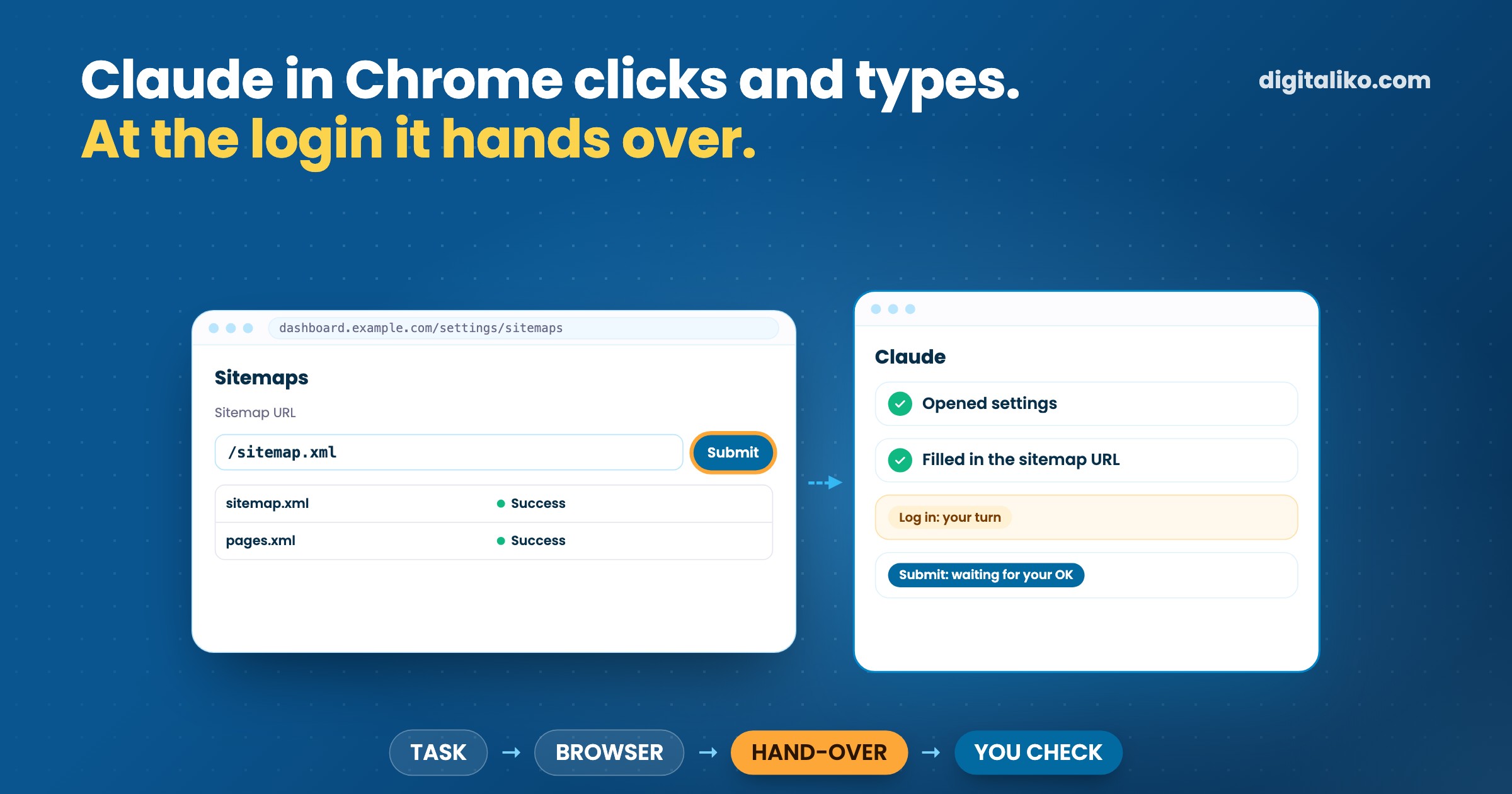
Claude in Chrome is Anthropic's browser extension that lets Claude navigate, click, type and read pages in your own Chrome, logged in as you. Since August 2026 it is generally available on every paid Claude plan and can work through a task on its own, with a safety check on each action. In October 2026 we used it for a day of real web admin and a UX audit of our own website: it did the clicking, and a person stepped in at every login, CAPTCHA and irreversible step.
This article is about the practical side. What it can do today, how much it changed in a year, what it was good at for us, where it stopped, and when we still write a Playwright script instead.
What is Claude in Chrome and what can it do?
The extension gives Claude the browser you already use. According to the Anthropic help center, it reads, clicks and navigates websites alongside you, and you can start a task from the Chrome side panel, from Claude Cowork or from Claude Code. It works across several tabs in a tab group, can run saved shortcuts and scheduled tasks, and in the classic side panel it can learn a workflow you record.
For developers the interesting part is Claude Code with Chrome. Start it with one flag:
claude --chromeClaude Code then opens its own tabs in your browser and shares your login state, so it can work in any site you are already signed into. It reads console errors, network requests and the DOM, uploads files, records a GIF of what it did and saves screenshots. The docs are direct about the hand-off: "When Claude encounters a login page or CAPTCHA, it pauses and asks you to handle it manually."
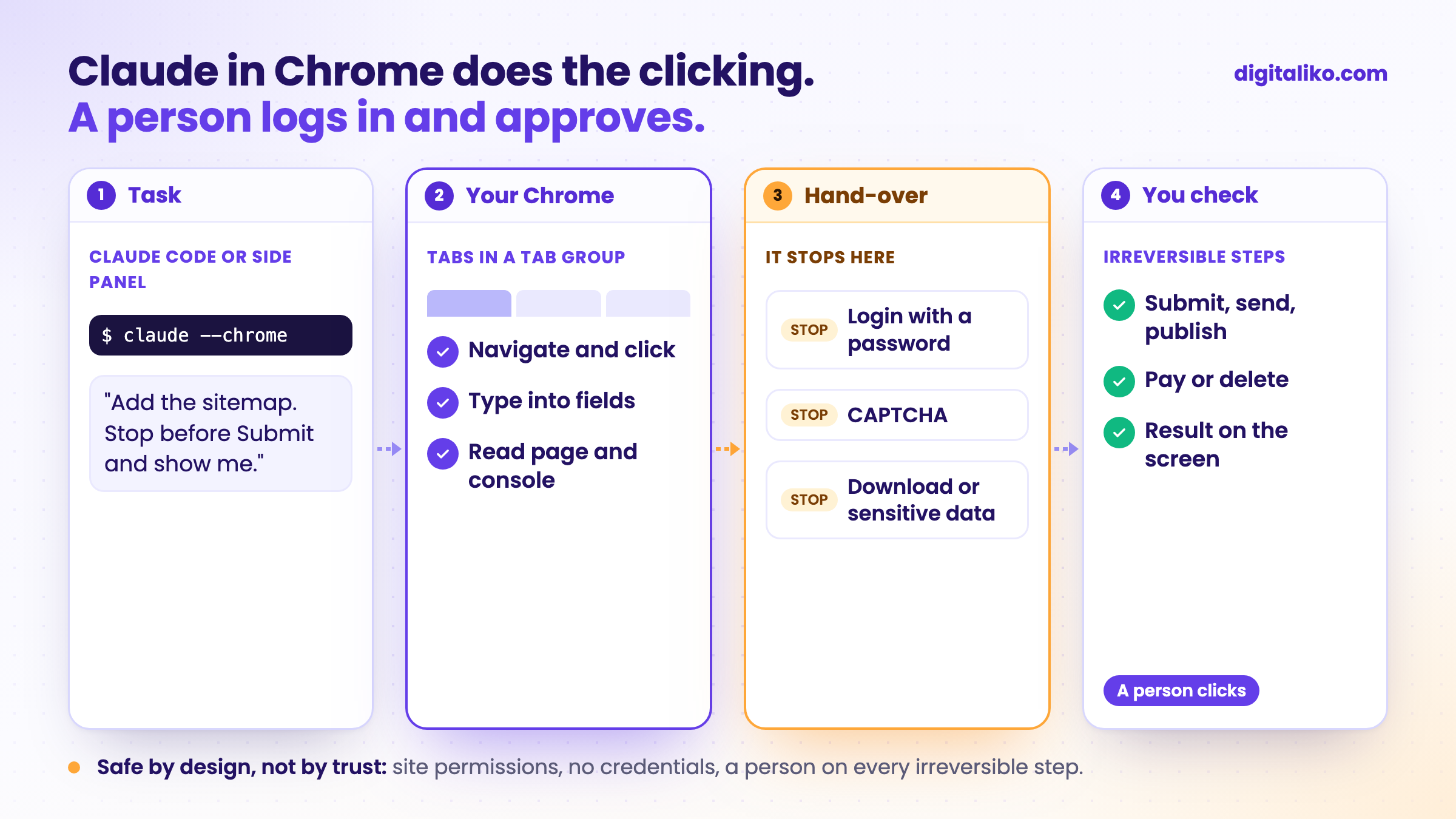
What you need: a paid plan (Pro, Max, Team or Enterprise) and desktop Google Chrome. The side panel does not run in other Chromium browsers or on mobile. Claude Code can also connect through Edge and detects the extension in Brave, Arc, Vivaldi and Opera. It needs a normal /login; with an API key the Chrome integration stays off.
How much has Claude in Chrome improved?
A lot, and mostly in one direction: from "approve every click" to "works on its own, with a classifier watching each action".
| Date | What changed | Source |
|---|---|---|
| 25 Aug 2025 | Pilot for a small group of Max users, approval prompts before risky actions | Anthropic |
| 24 Nov 2025 | Beta for all Max subscribers | Anthropic |
| 18 Dec 2025 | Beta also for Pro, Team and Enterprise | Anthropic |
| 12 Aug 2026 | The side panel becomes a Cowork session: skills, connectors, history, continue on another device | Anthropic |
| 26 Aug 2026 | Generally available on every paid plan; acts autonomously by default, a classifier validates each action | Anthropic |
The safety results moved too. In the pilot announcement Anthropic was open that a share of prompt-injection attacks still got through even with its mitigations, which is why it started small. In the general availability post it retired that test, because no attack succeeded against its current models any more, and on a new, harder test with the probes and the action classifier on, no attack succeeded against Claude Opus 5 or Sonnet 5.
What did not change: it still runs only in Chrome on the desktop, and Anthropic still calls prompt injection "a moving target".
What did we use Claude in Chrome for?
One working day, from Claude Code, in a normal Chrome profile with the accounts the tasks needed. Described without account details:
- Search engine tools. Submit our sitemap in Google Search Console and in Bing Webmaster Tools.
- Cookie banner. Add banner languages in the dashboard of our cookie-consent tool.
- B2B analytics. Set up a B2B visitor-identification tool and switch off its person-level form tracking, which we did not want.
- Two offers in Google Sheets. Sheets draws its grid on a canvas, so the page text was not readable. Claude read both offers through a read-only HTML view of the sheet instead.
- A live UX audit of our website. 26 pages at four screen widths: console errors, broken images, horizontal overflow, and flows like the menu, the language switcher and forms, filled in but never submitted.
None of these is hard. They are the kind of web admin with no API worth scripting, done once, across five different dashboards. That is where the extension saved the most attention.
Where did it stop and hand over to a person?
Every stop was in a place where we wanted it to stop:
- Logins with a password. It did not type passwords. The person logged in, and Claude continued in the same tab.
- A forced password reset. One tool asked for a new password in the middle of the task. A person did it.
- A CAPTCHA. It does not solve them. A person did, then Claude went on.
- Submitting and buying. It never sent a form or bought anything without an explicit yes. In the audit it filled forms only to check validation and stopped before the submit button.
What was hard had nothing to do with intelligence:
| What was hard | Why | What helps |
|---|---|---|
| Narrow screens | A Chrome window would not go below about 525 px wide, so a real phone width could not be tested by resizing | A Playwright script with a fixed phone viewport |
| Consent already stored | The browser remembered our cookie choice, so the banner did not show up for the audit | Clear the stored consent first, or use a fresh profile |
| Canvas apps | Apps that paint on a canvas, like Sheets, have no page text to read | A text view such as a read-only HTML export |
Claude in Chrome or Playwright?
We use both, for different jobs. For the checks we repeat after every change we use Playwright scripts, and how an agent proves its own change in the browser is in Playwright MCP: let the AI agent prove it works. The phone width our Chrome window could not reach is exactly where a script with a fixed viewport is better.
For one-off web admin
Claude in Chrome
- Your real browser, already logged in
- Good for one-off admin in dashboards and for exploring a page
- Stops for logins, CAPTCHAs and your approval
Playwright scripts
- Same check the same way on every run, in CI
- Any viewport, including real phone widths
- Clean browser, no personal accounts; someone writes the script first
By hand
- Fine for a single setting you change once a year
- No setup, no risk from web content
- Slow and boring across many pages or tools
A simple rule: if you will do it again next week, write a script. If you will do it once, in five dashboards you are logged into, let Claude click.
How to start with Claude in Chrome safely
01
Use a separate Chrome profile
Only the accounts the task needs. No banking, health or government accounts, as Anthropic also recommends.
02
Start with manual approval
Pick "Manually approve" for the first tasks and watch what Claude wants to do before you switch to automatic approval.
03
Allow sites one at a time
"Allow this action" before "Always allow actions on this site". Revoke sites you no longer need in the extension settings.
04
Write the stop into the task
"Fill it in and stop before Save, show me first." Irreversible steps are clicked by a person.
05
Log in yourself
Never paste a password, a card number or an API key into the chat. When Claude reaches a login, you take over.
Claude also asks on its own before some actions, even on a site you always allow: downloading a file, entering potentially sensitive information and granting authorizations. According to the permissions guide, it does not make purchases, create accounts, permanently delete anything or follow instructions found in emails or web content.
What is the real risk?
The risk is not that Claude clicks the wrong button. It is that a web page tells it to. Text on a page, in an email or in a document can contain instructions meant for the agent, not for you. Anthropic's safety guide calls this prompt injection the biggest risk for browser agents and runs classifiers against it, but says the risk is not zero.
One more detail from the same guide: Claude takes screenshots of the tabs it works in and cannot filter sensitive content out of what it sees. Whatever is on the screen goes into the conversation.
Prompt injection remains a moving target.
The same discipline applies to agents in a terminal. How we decide what a coding agent may do without asking is in Claude Code dangerously-skip-permissions: when is it safe?.
Is a task a good fit for Claude in Chrome?
Want agents in your team's workflow, with rules around them?
We set up agents, browser checks and the rules around them right in a team's repository as part of AI-native SDLC for development teams. AI writes most of our code. A senior reviews every change and is accountable for what reaches production. Since 2023 we have delivered 15+ production projects.
We get back to you within two business days, and together we pick what to fix first.
If you'd rather talk first, book a 15-minute intro call.
Which web admin task does your team still click through by hand every month?
In short
- Claude in Chrome lets Claude click, type and read pages in your own Chrome, logged in as you.
- Since August 2026 it is on every paid plan and works on its own, with a classifier checking each action.
- It hands over at logins, CAPTCHAs and irreversible steps, and that is where it should.
- One-off web admin: Claude in Chrome. Checks you repeat: Playwright scripts.
Frequently asked questions
What is Claude in Chrome?
A browser extension from Anthropic that lets Claude read, click, type and navigate websites in your own Google Chrome. You start tasks from the side panel in Chrome, from Claude Cowork or from Claude Code.
Which plans include the Claude Chrome extension?
According to Anthropic it is available on the paid plans Pro, Max, Team and Enterprise. On Enterprise an owner has to turn it on. It runs in desktop Google Chrome; Claude Code can also connect to it in Edge and some other Chromium browsers.
Does Claude in Chrome type passwords or solve CAPTCHAs?
No. Anthropic lists bypassing CAPTCHAs among the actions it is prohibited from, and it asks for permission before entering sensitive information. In Claude Code it pauses at a login page or a CAPTCHA and asks you to handle it. In our use the person always logged in and Claude continued after that.
Claude in Chrome or Playwright: which one should I use?
Claude in Chrome for one-off work in dashboards you are already logged into and for exploring a page. Playwright scripts for any check you want to repeat the same way, for example in CI after every change.
Is Claude in Chrome safe to use?
Anthropic itself says it is still risky, mainly because of prompt injection from web content. Use a separate Chrome profile, allow sites one at a time, never give it credentials and review every irreversible step yourself. You stay responsible for what it does in your browser.
Ask AI about this article
The AI also draws on our other articles and experience from real projects.
ChatGPTClaudePerplexity

