Context engineering for coding agents: what goes in a repo
For CTOs and engineersHarness and checks

Filip PapranecFounder, Digitaliko
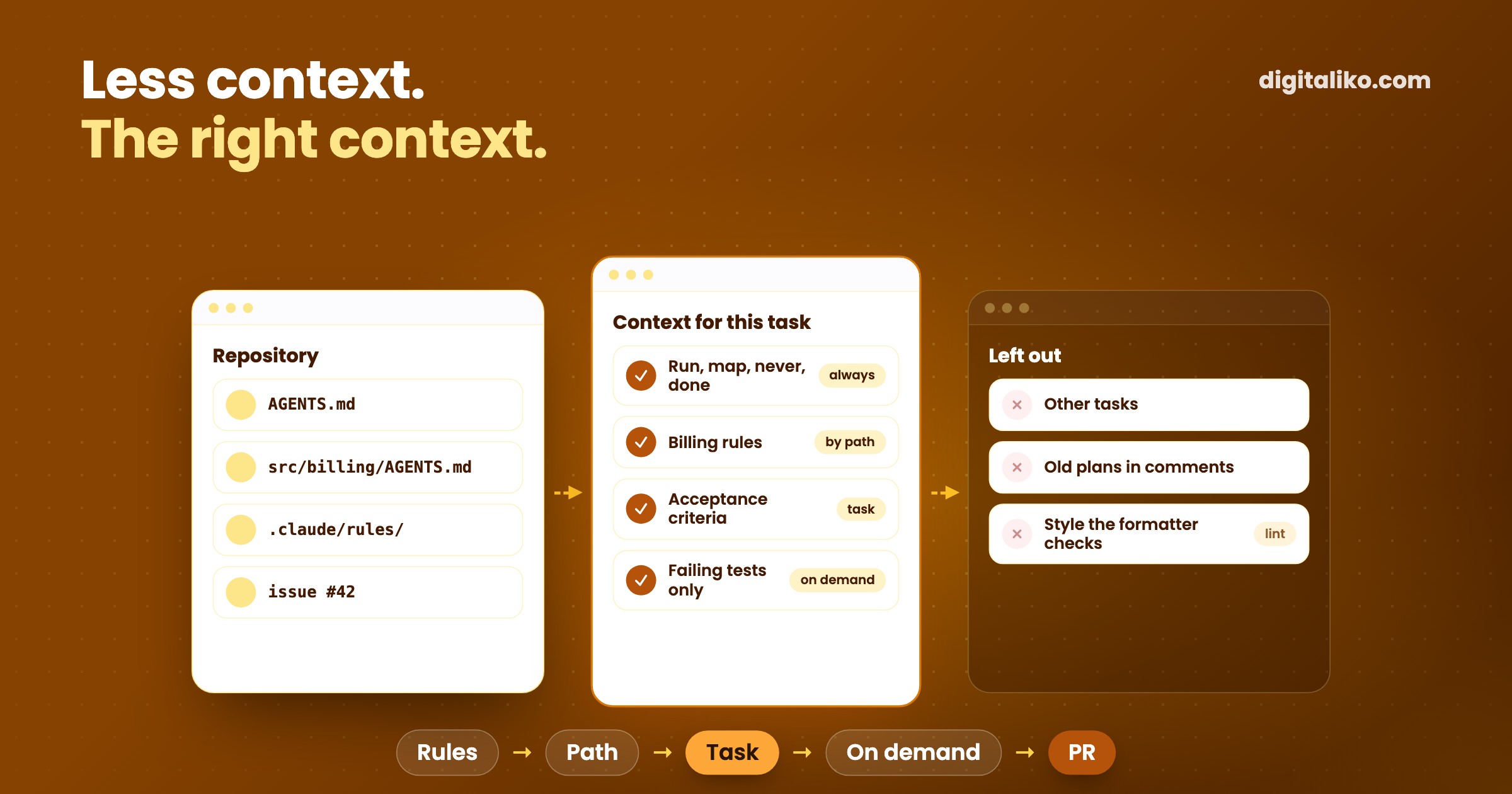
Context engineering is deciding what an AI coding agent sees before and while it works: the rules files, the task, the code it opens and the output of its tools. In a repository it comes down to three things. A short always-loaded file (AGENTS.md or CLAUDE.md), rules that load only where they apply, and a written task with acceptance criteria. Everything else the agent should fetch when it needs it, not carry from the start.
AI writes most of our code. A senior reviews every change and is accountable for what reaches production. Below is what goes into each layer, with generic examples you can copy, how we keep the context small, and what we removed because it made the agent worse.
Good context engineering means finding the smallest possible set of high-signal tokens that maximize the likelihood of some desired outcome.
What is context engineering?
A model only knows what is in its context window for this call. For a coding agent that window fills up fast: the system prompt, the rules files, the task, every file it reads, every command it runs and the output that comes back.
The window is a budget, not a bin. Anthropic describes context rot: as the context grows, the model's ability to recall what is in it drops. A rule on line 400 of a long file is technically there and practically gone.
So context engineering is mostly two decisions. What goes in by default. And what stays out until the agent asks for it.
Context, prompt or spec: what is the difference?
The three terms get mixed up. They describe different layers of the same thing.
| Prompt | Context | Spec | |
|---|---|---|---|
| What it is | One message to the model | Everything the model sees for the task | The part of the context that says what done means |
| Who writes it | The person asking | The team, the harness and the tools | The person who owns the task |
| Where it lives | The chat | Repository files, tool output, history | The issue or a linked document |
| How long it lives | One turn | One session | Until the task is merged |
| What goes wrong | Vague wording | Too much, stale or contradictory | Missing acceptance criteria |
The spec deserves its own article, and it has one: spec-driven development with AI agents. Here we stay with the repository: what sits in it so that every agent session starts with the right context.
What goes into the always-loaded file?
AGENTS.md (or CLAUDE.md for Claude Code) loads on every task. That makes it the most expensive text in the repository. Only what the agent cannot work out from the code belongs there.
A generic example that covers most repositories:
# AGENTS.md

## Run
- Install: `pnpm install`
- Check everything: `pnpm check` (typecheck, lint, tests)
- One test file: `pnpm test path/to/file.test.ts`

## Map
- `src/billing/` holds the invoice rules. It has its own AGENTS.md.
- `src/generated/` is generated. Never edit it by hand.
- Tests sit next to the code as `*.test.ts`.

## Never
- Touch the production database or `.env*` files.
- Change a migration that is already merged. Add a new one.
- Push to `main`. Open a pull request.

## Done means
- `pnpm check` is green.
- New behaviour has a test that failed before the change.
- The PR says what changed and how it was checked.
Four headings: how to run it, where things are, what is forbidden, what done means. If your team uses Claude Code next to other tools, keep one file. Current Claude Code reads AGENTS.md directly, and a CLAUDE.md with the single line @AGENTS.md imports it where it does not.
What does not belong there: style the formatter already enforces, architecture essays, the history of a decision and rules that apply in one folder only. How to decide where each rule lives, and which ones should be lint instead of text, is in CLAUDE.md and AGENTS.md: rules for AI code in a team.
How do rules load only where they apply?
Through the folder structure. A rule that matters only for billing should cost nothing while the agent edits the login page.
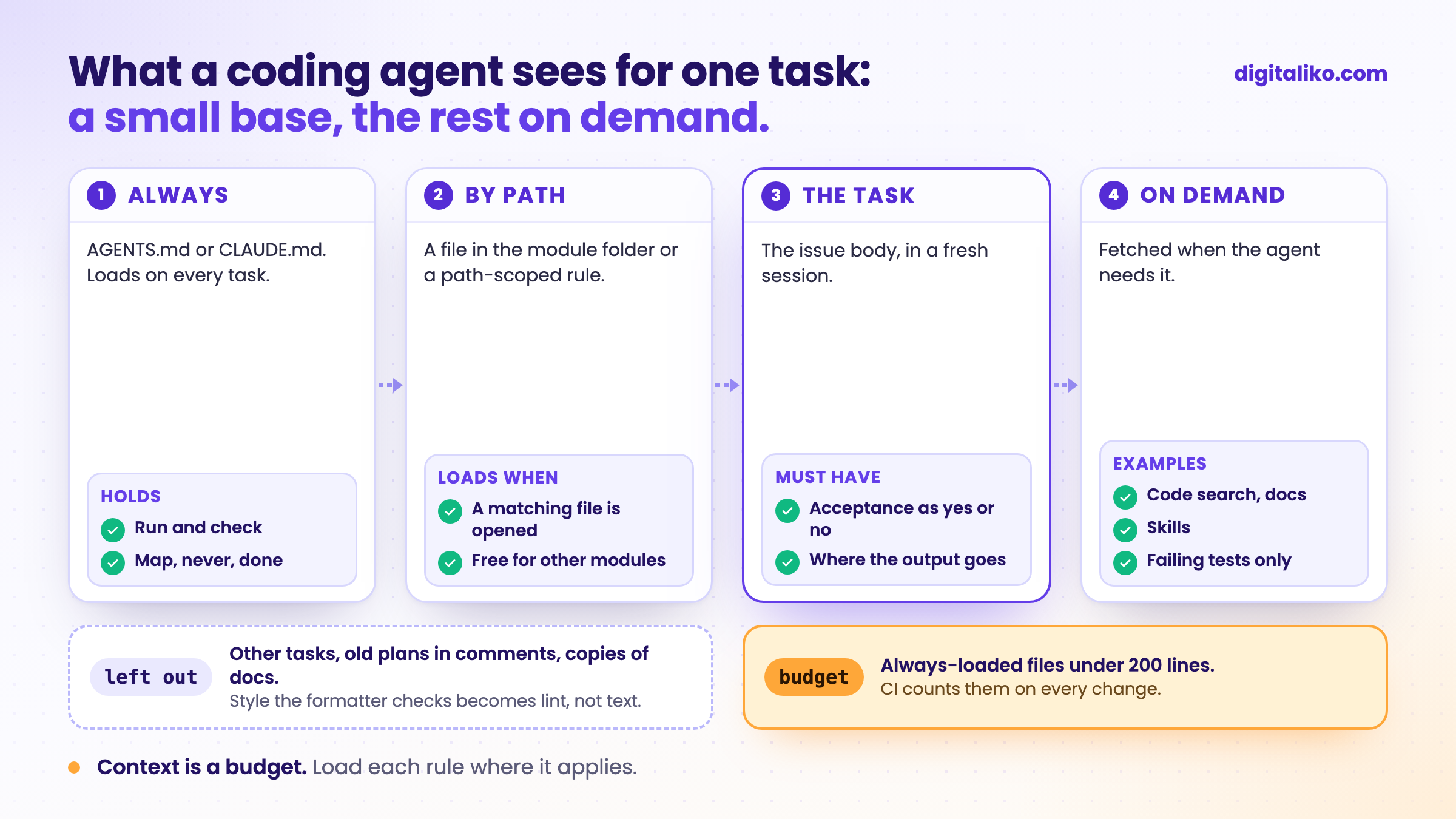
There are three mechanisms, and they work in this order:
- A file in the module folder.
src/billing/AGENTS.mdorsrc/billing/CLAUDE.md. Claude Code loads it on demand, once the agent reads or edits a file in that folder. - Path-scoped rules. A rule file under
.claude/rules/with apathsfield in its frontmatter loads only when the agent touches a matching file:
---
paths:
  - "src/billing/**/*.ts"
---

# Billing rules
- Money is integer cents. Never floats.
- Every price change writes an audit row.
- Skills and linked docs. A workflow such as "how we write a migration" lives in a skill or a document. The agent sees a one-line description and loads the body only when the task needs it.
One trap: an @path import does not save context. The imported file loads together with the file that imports it. Imports keep a long file tidy. They do not make it shorter.
What does the agent see for one task?
For us, one task means one GitHub issue, one fresh session and one pull request. Here is how the context for that session is put together.
01
A fresh session
No history from other tasks. Each issue starts clean in its own worktree.
02
The always-loaded file
Run, map, never, done. Short enough to read in a minute.
03
The task
The issue body: what to change, acceptance criteria, where the output goes.
04
Rules by path
Module rules load only when the agent opens files in that module.
05
Fetched on demand
Code search, docs, skills and test output, when the agent needs them.
The task is the part teams underrate. A minimal issue that an agent can finish:
## What
Add CSV export to the invoice list.

## Acceptance
- An empty list exports the header row only.
- Totals in the file match the invoice detail.

## Output
One PR with a test that fails on main and passes on the branch.
Two more rules are worth having in any loop. Text from outside, such as issue comments and pasted emails, reaches the model marked as data, not instructions. And the reviewer gets its own fresh context with read-only tools. It sees the task, the diff and the checks, not the reasoning of the agent that wrote the code. That is the point: it judges the result, not the story. More on that in harness engineering in practice.
How do you keep the context small?
Most context does not get added on purpose. It piles up. These habits keep it in check:
- Pointers, not copies. "API rules are in
docs/api.md" costs one line. Pasting the document costs a hundred, and it goes stale. - A budget the build checks. "Keep it short" lasts about two weeks. A line count in CI lasts.
- One task per session. A long session drags every earlier task into the next one. A fresh session is cheaper than a summary.
- Searches in a subagent. Let a side agent read twenty files and return ten lines. The main session gets the answer, not the search.
- Short tool output. A test runner that prints only the failures gives the agent what it needs. Two thousand lines of passing tests give it noise.
A budget check is a few lines. Anthropic suggests under 200 lines per CLAUDE.md:
# fail CI when the always-loaded agent files grow past the budget
total=$(cat AGENTS.md CLAUDE.md 2>/dev/null | wc -l)
[ "$total" -le 200 ] || { echo "Agent context: $total lines (max 200)"; exit 1; }Ours counts the root file and every rule that loads unconditionally, together, so its ceiling is 300 lines, not 200. It runs in CI in our repositories. How that fits into a team's setup is in Claude Code best practices for a team.
What did we remove from the context?
More than we added. The changes that helped most were deletions:
- Old plans in issue comments. Our readiness check read the whole issue thread. An outdated plan in a comment made it refute issues that were fine. Now only the issue body counts as the task. Stale context is worse than none.
- Copies of the rules. Rules copied into several repositories drifted apart within weeks. Now one versioned source loads everywhere.
- Workflows in the root file. Long how-to sections moved into skills that load only when used. The root file kept only the text that applies to every task.
- Rules that mattered most, as text. The important ones became lint, tests and hooks. They no longer need to be in the context at all, because they stop a bad change on their own.
An agent can read a text its own way. Not a check.

That last point is the boundary of context engineering. Context makes the right path likely. Checks make the wrong path impossible. You need both.
Is your repository's context in shape?
Want this set up in your repository?
We set up the rules files, the path-scoped rules, the issue format and the checks right in a team's repository as part of AI-native SDLC for development teams. Since 2023 we have delivered 15+ production projects. A senior plugs into your repository and pull requests on day one.
We get back to you within two business days with a few questions about your work. Then you get a list: what will be done and how you can check it.
If you'd rather talk first, book a 15-minute intro call.
What does your agent read first today, and when did someone last delete a line from it?
In short
- Context engineering decides what a coding agent sees: rules files, the task, the files it opens and tool output.
- The always-loaded AGENTS.md or CLAUDE.md holds four things: run, map, never, done. Keep it under 200 lines.
- Module rules load only where they apply: a file in the folder or a path-scoped rule.
- One task per fresh session, with a written task and acceptance criteria.
- More context is not better. Delete stale text, and turn the rules that matter most into checks.
Frequently asked questions
What is context engineering?
Deciding what an AI model sees before and while it works: instructions, rules files, the task, the files it opens, tool output and history. For a coding agent most of that context lives in the repository, so context engineering is largely repository work.
What is the difference between context engineering and prompt engineering?
Prompt engineering tunes one message. Context engineering manages everything else the model sees across a whole task: which rules load, which files it reads, what a tool returns and what is dropped. A good prompt cannot fix an agent that never sees your conventions.
What goes into AGENTS.md or CLAUDE.md?
What the agent cannot work out from the code: how to run and check the project, where things are, what it must never do and what done means. Keep it short, because it loads on every task. Rules for one module go into that module, not the root file.
Is more context better for a coding agent?
No. Every line competes for the model's attention, and recall drops as the context grows. Give the agent a small, relevant base and let it fetch the rest when it needs it.
How does context engineering relate to a spec?
The spec is the part of the context that says what done means. In our case it is the issue: what to change, acceptance criteria and where the output goes. Without it, more context only produces a more confident wrong result.
Ask AI about this article
The AI also draws on our other articles and experience from real projects.
ChatGPTClaudePerplexity

