GitHub Actions self-hosted runner for the whole org
For CTOs and engineersCTO decisions · Updated

Filip PapranecFounder, Digitaliko
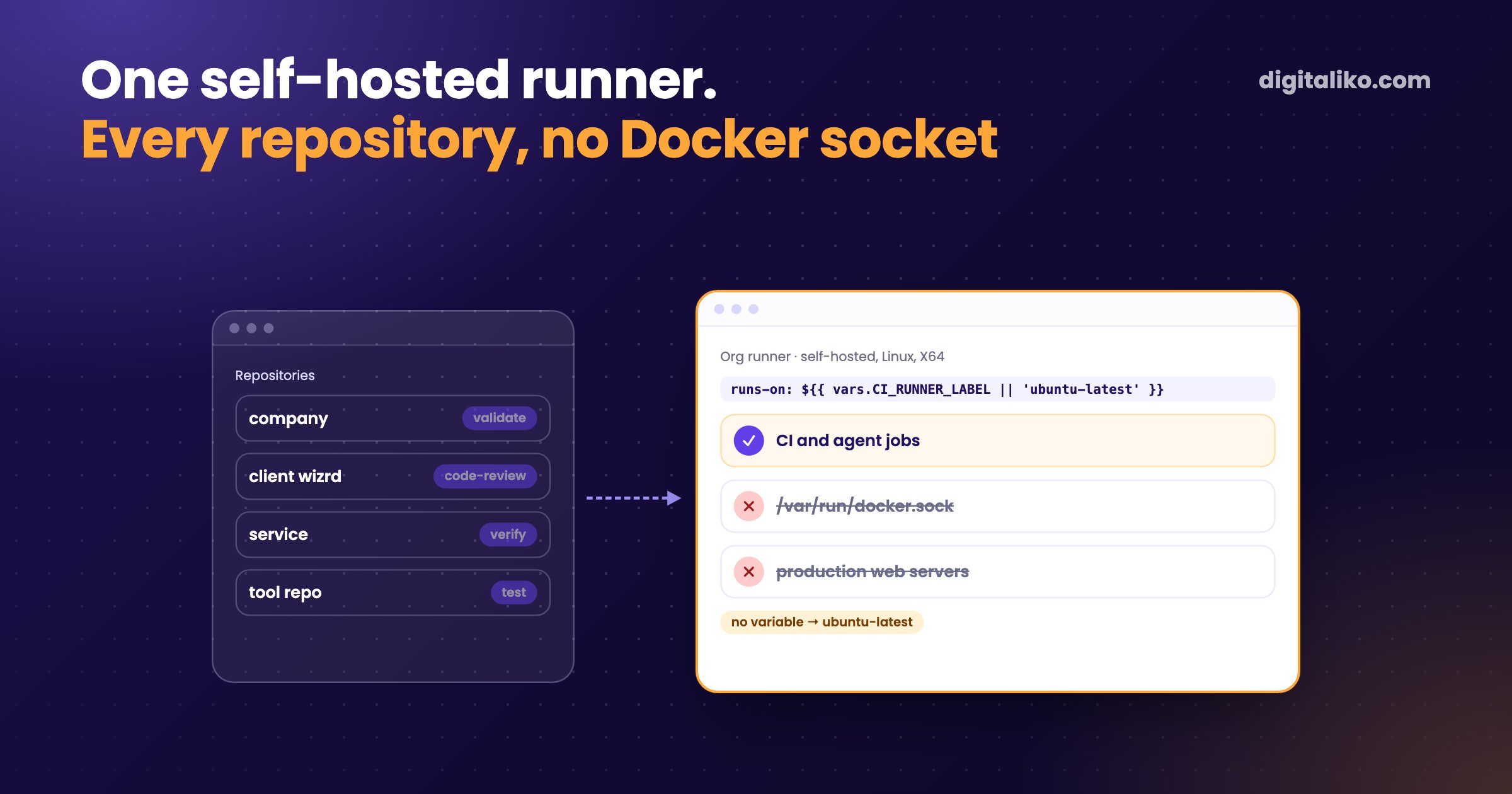
A GitHub Actions self-hosted runner is a machine you manage that picks up jobs from your workflows. We run one for the whole organization. Every repository chooses it through one organization variable and falls back to GitHub-hosted runners without it.
Three decisions make it work for us. The runner sits at organization scope, not per repository. It has no access to the Docker socket, on purpose. And repositories owned by our clients never run on it.
What is a self-hosted runner and when is it worth it?
GitHub's hosted runners are fresh virtual machines that GitHub starts for each job. A self-hosted runner is your own machine running GitHub's runner application. You install it, keep it updated and decide what it may reach.
| GitHub-hosted runner | Self-hosted runner | |
|---|---|---|
| Machine | A fresh VM per job, managed by GitHub | Your server, VM or computer |
| Clean state | Every job starts clean | Not guaranteed, files and processes can persist |
| Software | GitHub's image | Whatever you install |
| Network | Public internet | Can reach your private network |
| Who maintains it | GitHub | You: updates, disk, security |
| Billing | Actions minutes on your plan | Your own machine |
A self-hosted runner pays off when jobs run often, when they need something the hosted image does not have, or when long agent jobs would eat hosted minutes. For us it was the last two. Our CI runs a validator, an AI code review and an AI verification step on most pull requests, across many repositories.
How do we pick the runner per repository?
We do not name the runner in any workflow. Every workflow template has the same line. Its validate step comes from wizrd, our internal Claude Code plugin and CLI (not public), and the same pattern works with your own action:
jobs:
  validate:
    runs-on: ${{ vars.CI_RUNNER_LABEL || 'ubuntu-latest' }}
    steps:
      - uses: actions/checkout@v4
      - uses: Digitaliko/wizrd/.github/actions/validate@v1
CI_RUNNER_LABEL is an organization variable with the value self-hosted, visible to all repositories. When it is set, the job goes to our runner. When it is missing, the expression falls back to ubuntu-latest.
That fallback is the whole point. If the box dies, one edit of the variable sends every repository back to hosted runners. Nobody edits a single workflow file.
Setting it up took four steps:
01
Register at organization scope
Add the runner under the organization's settings, not under one repository, so every repository in the org can send it jobs.
02
Set the organization variable
CI_RUNNER_LABEL = self-hosted, visible to all repositories.
03
One runs-on line everywhere
Every workflow template uses the expression with the ubuntu-latest fallback. The templates are the only place it is written.
04
Keep the runner bare
Shared actions install Node and Bun themselves with setup-node and setup-bun, so the box needs almost nothing preinstalled.
GitHub documents the organization option directly: runners added "at the organization level, where they can be used to process jobs for multiple repositories in an organization" (GitHub docs, as of 2026-10-24).
Why did we take Docker away from the runner?
Because a CI runner runs code from pull requests. GitHub is blunt about what that means:
Self-hosted runners for GitHub do not have guarantees around running in ephemeral clean virtual machines, and can be persistently compromised by untrusted code in a workflow.
Add the Docker socket and it gets worse. Docker's own security page says "only trusted users should be allowed to control your Docker daemon", because a container can mount the host's root directory (Docker docs, as of 2026-10-24). A workflow step that can reach the socket can start such a container and become root on the box.
So on 2026-09-28 we unmounted the host socket from the runners. Jobs that needed service containers started failing at Initialize containers. The honest part: their CI had already been red for weeks before that, and nobody had noticed. Only the error message changed.
What runs on the runner and what does not?
CI and agent work only: the validator, the AI code review, the AI verification step and the stages of our agent pipeline. Not production. How the verification step judges a pull request is in LLM as a judge.
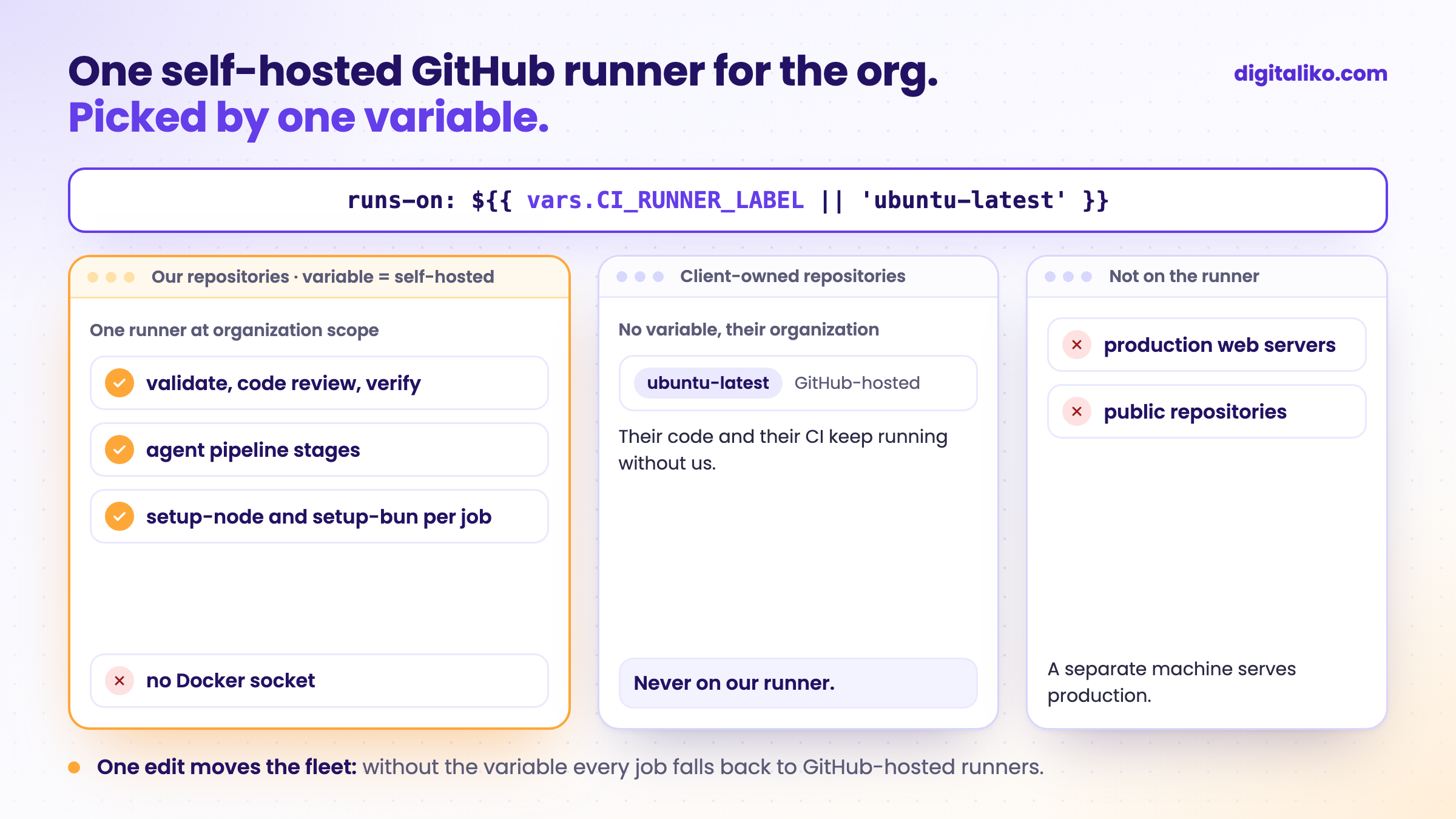
The production web servers are a separate machine. Builds used to run next to production on one client project, and production could be scaled down once builds moved off. Putting CI back next to it would bring back the contention that move fixed.
The runner itself stays bare. Our verify action starts like this, because the reviewer needs Node and the repository scripts need their package manager:
steps:
  # the self-hosted runner is bare: the reviewer needs node, the repo scripts need their package manager
  - uses: actions/setup-node@v4
    with:
      node-version: 22
  - uses: oven-sh/setup-bun@v2
  - shell: bash
    run: corepack enable
Every job declares what it needs. A job that works on our runner also works on ubuntu-latest, which is what makes the fallback safe.
Why do client-owned repositories stay on hosted runners?
Some repositories belong to our clients, in the client's own GitHub organization. Their workflows keep runs-on: ubuntu-latest. Three reasons:
- It is their code and their CI. A client who owns the repository should not depend on a machine we run. If we stop working together, their CI keeps running without a single change.
- Our runner lives in our organization. An organization runner serves the repositories of that organization. Reaching across organizations would mean a second registration and a second trust boundary.
- Less to explain. Nobody has to ask what runs their code, or where.
The rule is written in our validation docs. Repositories in our organization follow the org variable. Client-owned service repositories stay on ubuntu-latest.
Is a self-hosted runner right for your organization?
Go through what you have today:
The last point is the limit that bites first. One runner process takes one job at a time, and everything else waits. Short jobs hide it. Long agent jobs will not. More runner processes on the same box are the cheaper fix, before a bigger machine.
What runs on our runner, the AI review of every pull request, is in Claude Code review: AI code review in CI. How far we let an agent go on its own machine is in Claude Code dangerously skip permissions.
Need CI that a whole team and its agents can rely on?
We set up runners, shared CI actions and the review around them for development teams as part of a senior developer for your team. The agent side is covered by AI-native SDLC for development teams. AI writes all of our code today, and a senior is accountable for the result. Since 2023 we have delivered 15+ production projects.
We get back to you within two business days, and together we pick what to fix first.
If you'd rather talk first, book a 15-minute meeting with Filip.
If your runner died tonight, how many workflow files would you have to edit tomorrow?
In short
- One runner at organization scope serves every repository in the org.
- runs-on: ${{ vars.CI_RUNNER_LABEL || 'ubuntu-latest' }} picks it, and one variable sends everything back to hosted runners.
- No Docker socket: whoever controls the daemon is root on the box.
- Client-owned repositories and production stay off the runner.
Frequently asked questions
What is a GitHub Actions self-hosted runner?
A machine you manage that runs the GitHub Actions runner application and picks up jobs from your workflows. It can be a cloud server, a VM or a computer in your office. You choose it in a workflow with runs-on and its labels.
Can one self-hosted runner serve every repository in an organization?
Yes. A runner registered at the organization level can process jobs for multiple repositories in that organization. Runner groups let you limit which repositories may use it.
Is a self-hosted runner safe for public repositories?
GitHub says self-hosted runners should almost never be used for public repositories, because anyone can open a pull request and run code on the machine. Even on private repositories, anyone who can open a pull request can run code there.
How do I switch between a self-hosted and a GitHub-hosted runner?
Use an expression in runs-on: runs-on: ${{ vars.CI_RUNNER_LABEL || 'ubuntu-latest' }}. With the variable set, jobs go to your runner. Without it, they fall back to GitHub-hosted Ubuntu. One edit of an organization variable moves every repository.
Why not mount the Docker socket into the runner?
Whoever can talk to the Docker daemon can start a container with the host file system mounted and become root on the machine. On a CI runner that is anyone who can open a pull request. If a job needs containers, give it its own daemon instead.
Ask AI about this article
The AI also draws on our other articles and experience from real projects.
ChatGPTClaudePerplexity