How to build an MCP server, and when you should not
For CTOs and engineersAI in the dev team · Updated

Filip PapranecFounder, Digitaliko
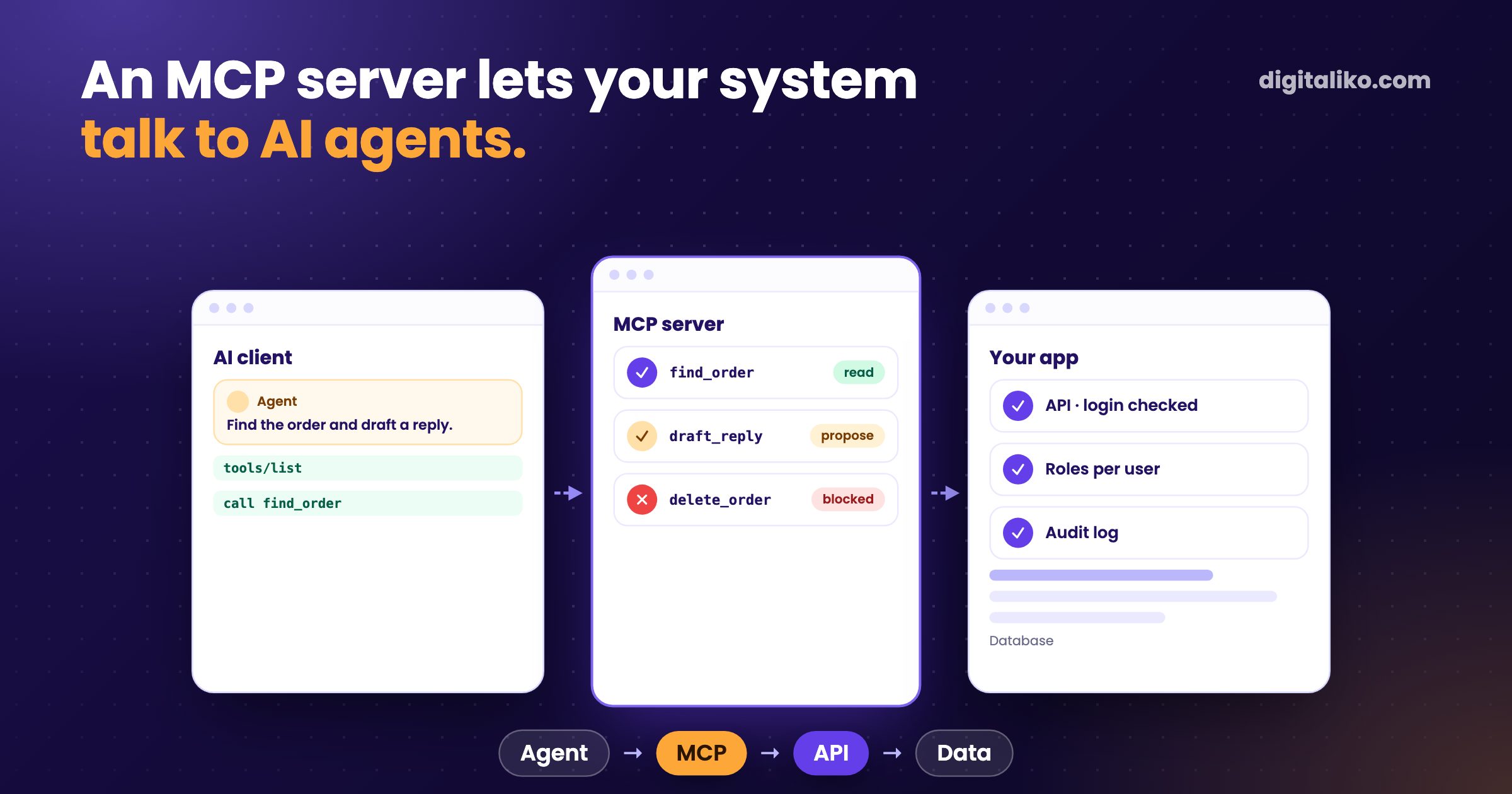
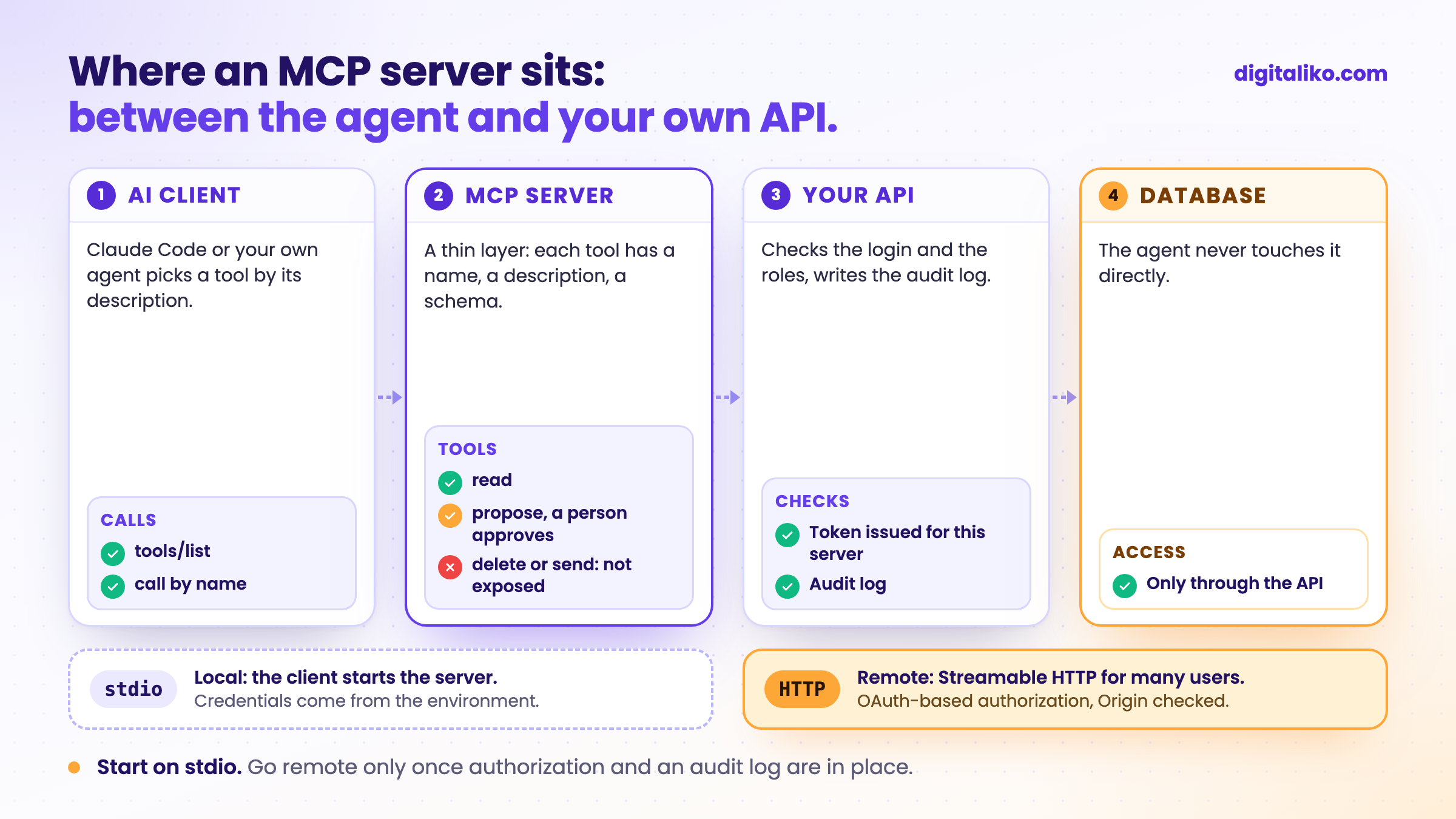
To build an MCP server you pick a transport, register a few tools with a name, a description and an input schema, and connect it to a client such as Claude Code. Use stdio for a local tool and Streamable HTTP for a remote server that many people use. The code is the small part. Which tools you expose, and with which rights, decides whether you can let an agent use it.
An MCP server is how your system talks to AI agents. We use MCP servers built by others every day, and we built one ourselves: a prototype for a freight forwarding company whose system we built and run. It stayed a prototype. Below is how to build one, what we would do differently, and when you do not need one at all.
What is an MCP server?
The Model Context Protocol is an open standard for connecting AI clients to tools and data. A server offers tools (actions), resources (data) and prompts. A client, such as Claude Code, Claude Desktop or an agent you build, lists the tools and calls them when the task needs it. The messages are JSON-RPC.
The agent never sees your database. It sees a list like this one:
find_order: look up one order by its number. Read-only.draft_reply: write a draft answer for a person to approve.
The name and the description are your interface. The model picks a tool by reading them, so a vague description gets a tool called at the wrong moment.
stdio or Streamable HTTP: local or remote?
The MCP specification defines two standard transports. The choice decides where the server runs and how it authenticates.
Start here
stdio (local)
- The client starts the server as a subprocess.
- Messages go over stdin and stdout.
- Credentials come from the environment.
- One user, one machine. The simplest start.
Streamable HTTP (remote)
- An independent process for many clients.
- One HTTP endpoint, for example /mcp.
- Authorization built on OAuth 2.1.
- Must validate the Origin header.
Authorization follows the transport. The authorization spec says that implementations using stdio "SHOULD NOT follow this specification, and instead retrieve credentials from the environment." A remote server acts as an OAuth 2.1 resource server and must check that every token it gets was issued for it.
How do you build an MCP server step by step?
01
Pick the jobs
A few things an agent should do with your system. Not your whole API.
02
Write the tools
A clear name, a description the model can act on, an input schema.
03
Run it on stdio
Local first, with credentials from the environment.
04
Connect a client
Add it to Claude Code and try the real task, not a demo.
05
Go remote last
Streamable HTTP only once authorization and an audit log are in place.
A minimal server with the official TypeScript SDK:
import { McpServer } from '@modelcontextprotocol/sdk/server/mcp.js'
import { StdioServerTransport } from '@modelcontextprotocol/sdk/server/stdio.js'
import { z } from 'zod'
import { getOrder } from './api.js'

const server = new McpServer({ name: 'orders', version: '0.1.0' })

server.registerTool(
  'find_order',
  {
    title: 'Find an order',
    description: 'Look up one order by its order number. Read-only.',
    inputSchema: { orderNumber: z.string() },
  },
  async ({ orderNumber }) => {
    const order = await getOrder(orderNumber) // your API, with the caller's rights
    return { content: [{ type: 'text', text: JSON.stringify(order) }] }
  },
)

await server.connect(new StdioServerTransport())
Connect it to Claude Code:
claude mcp add orders -- node dist/server.js
One trap catches almost everyone on stdio. The spec says the server "MUST NOT write anything to its stdout that is not a valid MCP message." A stray console.log breaks the connection. Log to stderr.
Then test with the real client and the real task. When an agent picks the wrong tool, look at the description before you touch the code.
What did we learn from our own MCP prototype?
Our prototype was a local stdio server on the official SDK, started from an open-source starter template. It had a single read tool, and it called the system's existing internal API with a placeholder login. Enough to see an agent answer questions from real data. Not enough for anyone to use day to day.
What we would do differently:
- API first. An MCP server is a thin layer over an API. Ours leaned on endpoints built for the app's own screens. A clean API with its own access rules should come first. How we think about that is in Pohoda API: connecting your system and who maintains it.
- A real login from day one. A placeholder login is fine for an afternoon. It is the first thing to replace, because it decides what the agent may see.
- The job before the server. We built the server before we knew which job an agent would do with it every day. The right order is the job, then the tools it needs, then the server.
Honestly: we have not run a remote MCP server in production yet. Everything above about Streamable HTTP and OAuth comes from the specification, not from our own incidents.
Which tools should an agent get?
Start read-only and add rights one at a time. Our default:
| Tool kind | Example | Our default |
|---|---|---|
| Read | find an order, list open shipments | expose, limited to the user's own data |
| Propose | draft a reply, suggest a price | expose, a person approves |
| Write | change a record | only with approval and an audit log |
| Delete or send | delete, email a customer, pay | do not expose |
The rule we use for our own agents applies here too. Merging, sending and deploying stay with a person, enforced below the agent, not by a sentence in its prompt. How that works in Claude Code is in Claude Code hooks that silently do nothing.
If I saw another solution that was more stable, clearer and more predictable, I would not build an agent.

When should you not build an MCP server?
An MCP server is for the case where an AI agent decides which action to take next. Many tasks never need that.
Skip it when:
- Your own code is the only caller. Call your API directly.
- The job is a fixed sequence. Plain automation beats an agent there.
- There is no clean API yet. Build that first.
- Nobody owns the rights model. Who may the agent act for, and what may it do? Without an answer, expose no writes.
Before you ship an MCP server
Want your system to work with AI agents?
We build AI agents and what they need underneath, from a clean API to the MCP server on top, as part of AI agents for business. For a team that wants agents inside its own development process, see AI-native SDLC for development teams. Since 2023 we have delivered 15+ production projects.
We get back to you within two business days, and together we pick what to fix first.
If you'd rather talk first, book a 15-minute meeting with Filip.
Which job in your system would you hand to an agent first?
In short
- An MCP server offers your system's tools to AI agents: a name, a description and an input schema each.
- Start local on stdio with credentials from the environment. Go remote only with OAuth-based authorization.
- The code is small. Which tools you expose, and with which rights, is the real work.
- Read first, propose next, writes with approval, never delete or send.
- If the steps are always the same, you do not need an agent or an MCP server.
Frequently asked questions
What is an MCP server?
A program that offers tools, data and prompts to an AI client through the Model Context Protocol. The agent sees each tool by name, description and input schema and decides when to call it. Your system stays behind your own code.
Should I use stdio or Streamable HTTP?
stdio when the server runs on the same machine as the client, for example a local tool for Claude Code. Streamable HTTP when it runs remotely for several users. A remote server needs real authorization.
How do I add an MCP server to Claude Code?
For a local server: claude mcp add <name> -- <command>. For a remote one: claude mcp add --transport http <name> <url>. Servers the whole team should get go into .mcp.json in the repository.
How do I secure an MCP server?
Locally, read credentials from the environment. Remotely, follow the MCP authorization spec, which builds on OAuth 2.1, and check that every token was issued for your server. Expose as few tools as you can, read-only first.
Do I need an MCP server for my product?
Only if AI agents should work with your system and choose what to do. If your own code is the only caller, or the steps are always the same, a direct API call or a scheduled job is simpler and easier to test.
Ask AI about this article
The AI also draws on our other articles and experience from real projects.
ChatGPTClaudePerplexity