PWA vs native app: which one does your business need?
For founders · Updated

Filip Papranecfounder of Digitaliko
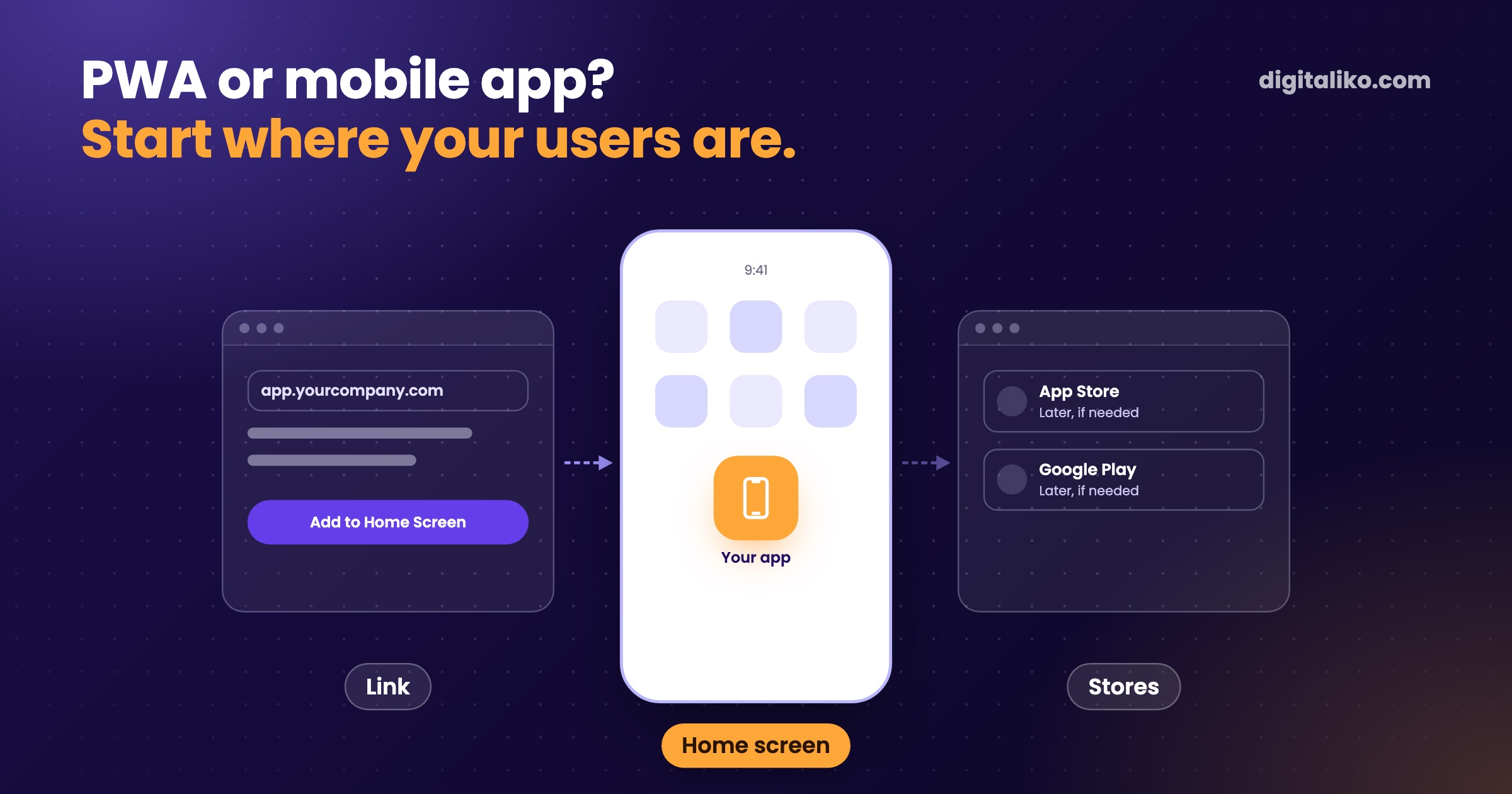
A PWA is enough when the app is used by your people or by customers you send a link to. Go to the App Store and Google Play when new people should find you directly in the store, or when you need phone features the web cannot reach. It often makes sense to start with a PWA and go to the stores once your first users confirm it.
Below we explain what a PWA is, how it differs from a store app, and how to test in five minutes which path you need.
What is a PWA?
A PWA (progressive web app) is a web app that a person adds to their phone home screen. From then on it opens like a normal app, with its own icon and no address bar. According to the MDN documentation it runs on many devices from one code base, can be installed and can work offline.
For a business that means three things. One code base for phone and computer. No store approval for every change. And a link you send by email or text message instead of "download our app".
By mobile app, people usually mean the one from the App Store and Google Play. We can build that in two ways. The first is React Native with Expo: one code base becomes an app for both iPhone and Android. The second is two native apps, each written separately for its own system. We do not build native apps.
What is the difference between a PWA and a mobile app?
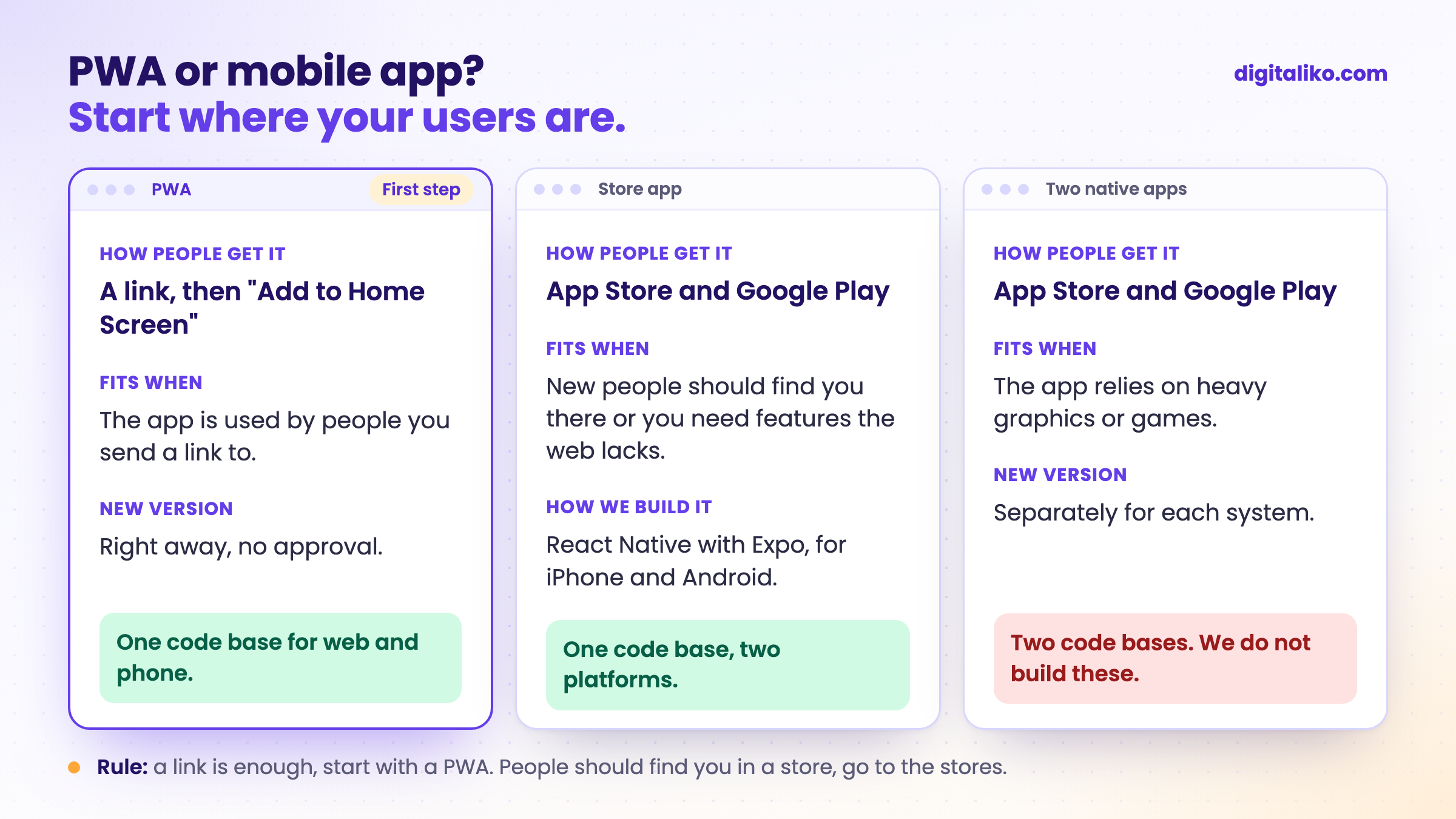
| PWA | Store app (React Native, Expo) | Two native apps | |
|---|---|---|---|
| How people get it | A link, then "Add to Home Screen" | Download from the App Store or Google Play | Download from the store |
| New version | Right away, like a website | Through store approval, some fixes without it | Through store approval, separately for each system |
| Notifications on iPhone | Yes, once the app is on the home screen | Yes | Yes |
| Phone features | Camera, location, files; no Bluetooth on iPhone | Almost all | All |
| Store fees | None | Apple and Google | Apple and Google |
| Code | One for web and phone | One for iPhone and Android | Two separate ones |
Notifications from a web app on iPhone work since iOS 16.4, if the person added it to the home screen and allowed them. A developer account costs 99 USD a year at Apple and 25 USD once at Google. Always keep these accounts in your company's name, not the vendor's.
When is a PWA enough?
Tick what is true for your app:
Typical examples are an app for field technicians, orders from regular customers, or an internal system people open on the phone and in the office. Nobody looks for them in the App Store. They only need a link and a login.
When do you need an app in the App Store and Google Play?
A store app makes sense in three situations. New customers should find you directly in the store. You need a phone feature the web cannot reach, such as a Bluetooth device paired with an iPhone. Or your customers simply expect an app from the store and a link to the web is not enough for them.
Then we build with React Native and Expo. React Native is a way to build an app for iPhone and Android from one code base. Expo is a set of tools on top of it that makes building, publishing to the stores and updating faster.
You will find the rule in the App Store Review Guidelines, section 4.2. What the store path means for your budget is covered in Mobile app development cost: what drives the price.
How we do it
First we write down what the first version should do and for whom. Then we pick the path by where your users are, not by what is in fashion.
01
List
Who uses the app, how they get to it and what it must do in the first version.
02
First version
Usually a PWA. You send the link to the first people and see right away what they actually use.
03
First users
Fixes based on where they got stuck. New versions reach them the same day.
04
Stores, if needed
When the data shows you need a store app, we build it with React Native and Expo.
On one project we had the first version in under 10 working days. For a client we built a digital document archive: admins work in the web app, users in a mobile app with scanning for Android and iOS.
This is how we do cross-platform mobile app development. If you are deciding what should go into the first version at all, continue with How long does MVP development take.
When we do not recommend it
- The app relies on heavy graphics or games. A native app makes sense there. We do not build those and will point you to someone else.
- You need a website, not an app. We do not build brochure websites. If people have nothing to do in the app, a website is enough.
- You want to be in the stores right away, without a single user. First check that someone will use the app. The stores can wait.
Not sure whether a PWA is enough?
Tell us who will use the app and what it should do. We get back to you within two business days, and together we pick what to fix first. We also tell you whether you need the app stores right now.
If you'd rather talk first, book a 15-minute meeting with Filip.
Where do you actually reach your users today: in their inbox, or in the App Store?
In short
- A PWA is a web app a person adds to their phone home screen. One code base, no approval, a link instead of a download.
- A PWA is enough when the app is used by people you send a link to and what the web can do on a phone covers your needs.
- Go to the App Store and Google Play when new people should find you there or you need features the web lacks.
- Always keep the app store accounts in your company's name.
Frequently asked questions
What is a PWA?
A web app that a person adds to their phone home screen and opens like a normal app. It is not downloaded from the App Store or Google Play, runs on one code base for phone and computer, and gets new versions right away.
When is a PWA enough instead of a mobile app?
When the app is used by your people or by customers you send a link to, and when what the web can do on a phone is enough: forms, photos, location, notifications. Then a PWA is the fastest way to your first users.
When do I need an app in the App Store and Google Play?
When new people should find you directly in the store, when you need phone features the web cannot reach, such as Bluetooth on an iPhone, or when your customers simply expect an app from the store.
Do PWA notifications work on iPhone?
Yes, since iOS 16.4. The condition is that the person first adds the app to the home screen and allows notifications themselves, for example by tapping a button.
Do you also build native apps for iOS and Android?
No. We build PWAs and store apps with React Native and Expo, meaning one code base for both platforms. If your app depends on something only a native app can do, we tell you right at the start.
Ask AI about this article
The AI also draws on our other articles and experience from real projects.
ChatGPTClaudePerplexity