Web scraping for business: when a crawler pays off
Process automation · Updated

Filip Papranecfounder of Digitaliko
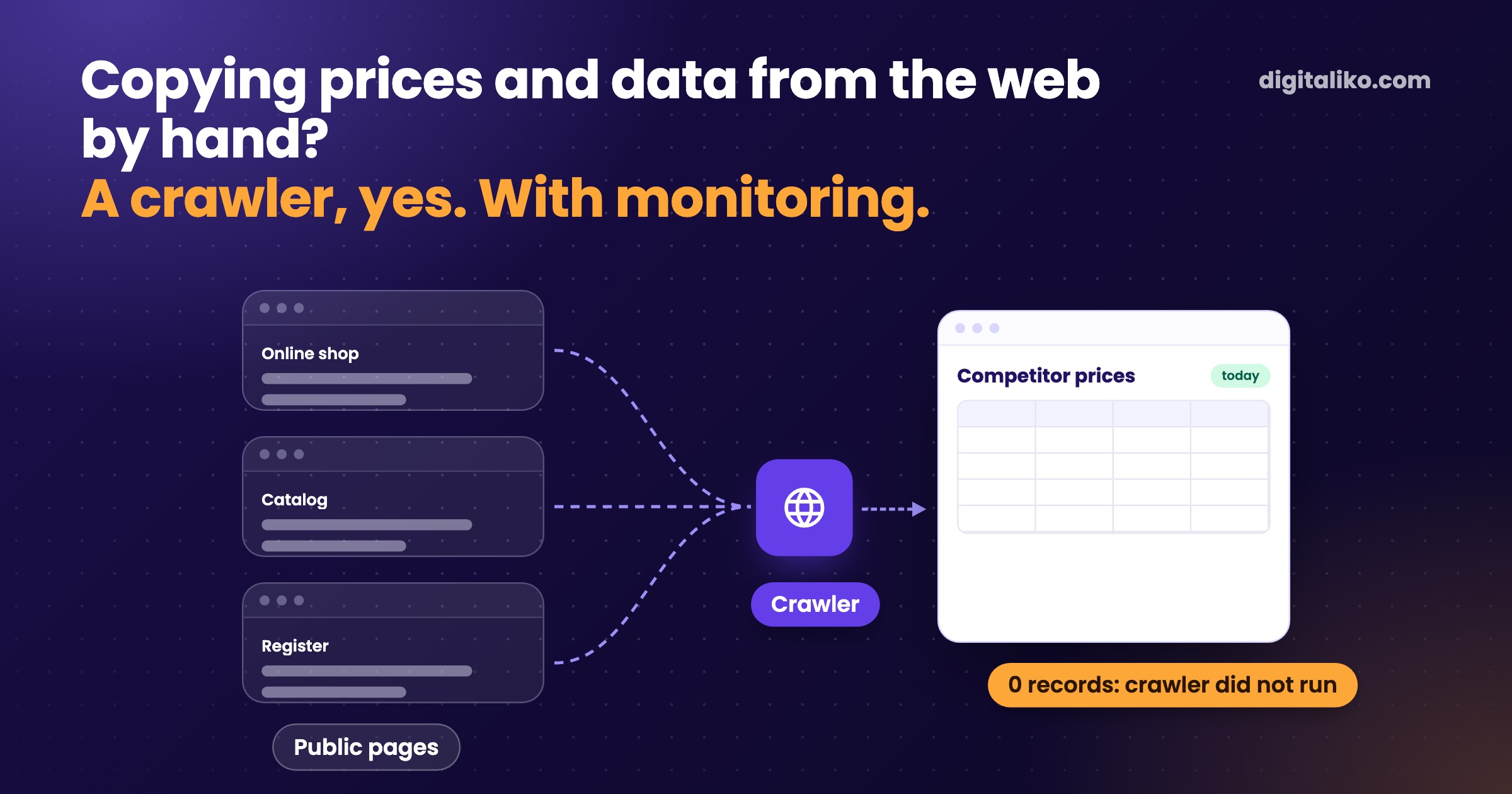
Competitor prices, supplier catalogs or data from public registers are copied by hand by someone in your company today. A crawler pays off when you need the same public data regularly and doing it by hand takes hours. If the source offers an export or API, use that first. And every crawler stops working one day, so it does not last without monitoring.
We know from our own experience. On a project for a client with an online marketplace, the crawler stopped running in December 2025. Traffic dropped from 250,000 to 66,000 pageviews a month. Below is when a crawler pays off, what breaks and how to watch it.
What do businesses use a crawler for?
Web scraping means a program goes through web pages and saves data from them into a table or a system. In companies we see it in three jobs:
| Job | What is collected | How often | Watch out for |
|---|---|---|---|
| Competitor price monitoring | Price, availability, promotions | Daily or weekly | Prices with and without VAT, product variants |
| Product data and catalogs | Names, specs, images from suppliers | When the range changes | Rights to texts and images, not everyone may reuse them |
| Public registers | Companies, addresses, case status | With every new contact | Many registers have an API or open data |
It usually starts with a spreadsheet. Once a week someone opens competitors' online shops, copies the prices into Excel and sends them to sales. How to tell the spreadsheet is no longer enough is in When is Excel no longer enough for a business?.
When does a crawler pay off?
Before you build a crawler, tick what is true for you:
If every answer is yes, a crawler makes sense. If not, pick a simpler route.
Do not underestimate the last point. You do not fix a crawler once, you fix it every time the source changes.
Our robot for another online shop's prices kept failing at the start. I adjusted it again and again until we got it to a state where it works.

Crawler, export or API?
You can get data from the web in three ways. A crawler is the last of them.
By hand
- Once, a few pages.
- Stability depends on the person.
- No maintenance, but it costs time.
- For a one-off collection.
Our advice
Export or API
- When the source offers it.
- Stable, the terms are written down.
- Low maintenance.
- Always the first choice.
Crawler
- Regularly, many pages, no API.
- A site change breaks it.
- Ongoing maintenance with monitoring.
- Only when the first two fall short.
Collected data is only the start. It is worth something once sales or a system acts on it, for example by flagging a price change. We build that kind of automation as part of business process automation.
What breaks on a crawler?
A crawler depends on a site you do not own. It changes without anyone telling you. The site changes its layout or URLs, blocks you, or the crawler simply stops running:
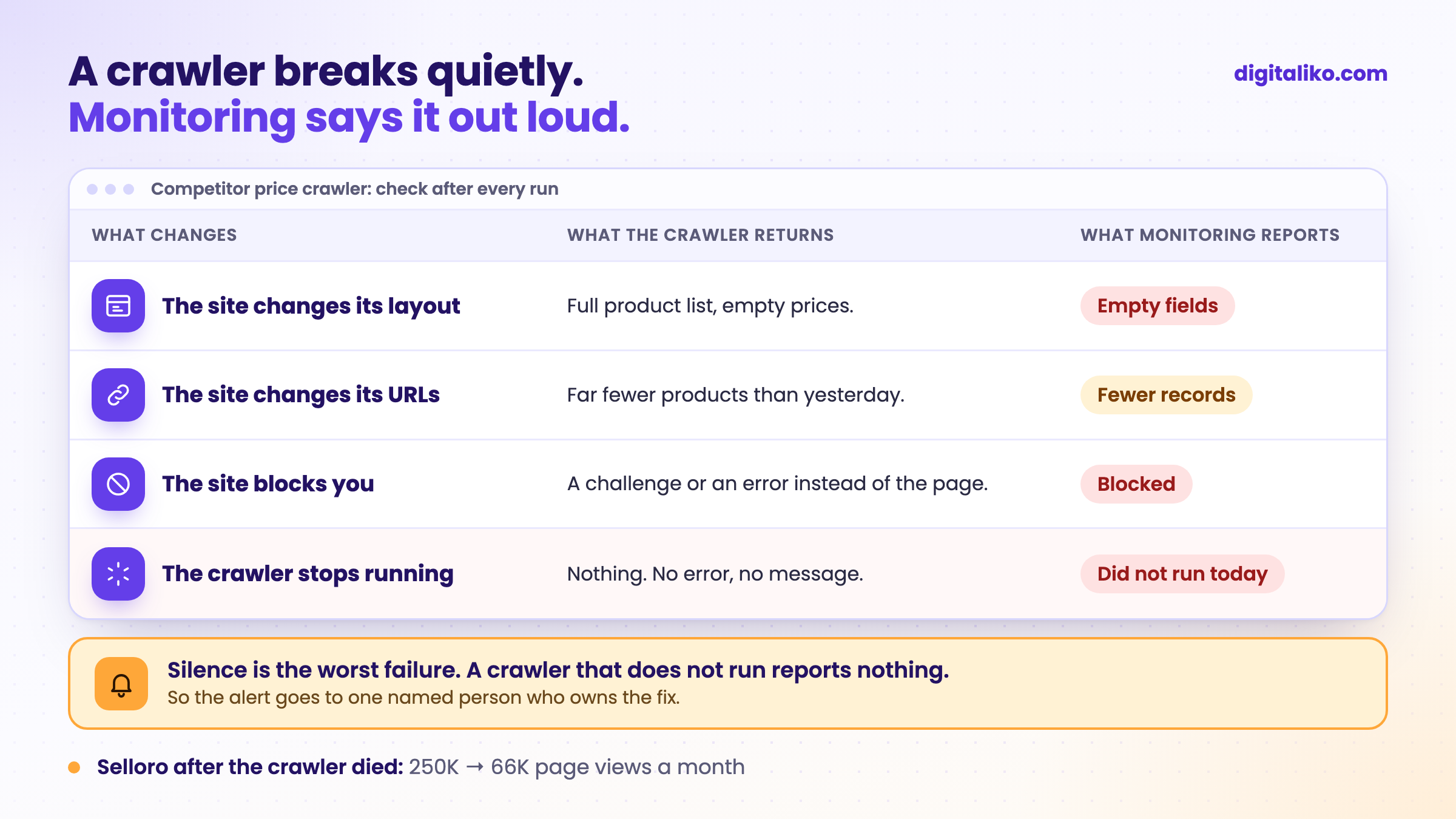
The last case is the most treacherous, because nothing reports it. That is exactly what happened to us. On a client's online marketplace, the crawler stopped running in December 2025. We found out late, from a chart. Meanwhile traffic dropped from 250,000 to 66,000 pageviews a month.
How do you monitor a crawler?
Today we monitor whether the crawler ran. We learned the other three checks from our own mistakes. After every crawler run, check four things:
01
Did it run today?
If not, the alert goes to a named person, not a shared inbox.
02
Did it bring data?
Zero records, or far fewer than yesterday, is a failure, not a success.
03
Are the fields filled?
An empty price on a full list means the site changed.
04
Who fixes it?
A name, not "IT".
Without a name next to the fix, monitoring just reports the problem nicely. The fix comes only when someone owns it.
Why check the data too? Another time our crawler ran for several days, hit a run time limit and saved nothing. Every run started from zero. So it ran, but it brought no data. On top of that, the repository said how often it should run, and the server ran it on a different schedule.
What is legal in web scraping?
Publicly available does not mean free to use. We stick to these rules:
- Public data only. Nothing behind a login and nothing the site hides.
- Terms and robots.txt. If the site forbids collection, we do not collect.
- A considerate pace. No thousands of requests a minute. The server belongs to someone else.
- Personal data. Names, emails and phone numbers fall under GDPR even when they are public.
- Texts and images. They can be protected by copyright. A price is a fact, a product description is someone else's text.
Our crawler for that client introduces itself to sites with its own name and a link to a page that explains who is collecting and why. We switched off one source because its terms forbid automation.
When we don't recommend it
Automating does not mean doing everything faster. Sometimes it is better to find the part you can skip.
- You need the data once. Copy it by hand or order a one-off collection. A crawler will not pay back.
- The source offers an export, open data or an API. Use them. A crawler would be the more expensive and more fragile route.
- The data is behind a login or the terms forbid collection. Do not build one. Agree on access with the source.
- Nobody will use the result or fix the crawler. A spreadsheet nobody opens saves nothing.
If you want to automate work that means reading free text rather than pages, see What is an AI agent?.
Copying data from the web by hand?
Tell us what data you collect, from where and how often. We get back to you within two business days, and together we pick what to fix first. We will also tell you if an export or API is enough.
If you'd rather talk first, book a 15-minute meeting with Filip.
Which data does someone in your company copy from another site every week?
In short
- A crawler pays off when you need the same public data regularly and doing it by hand takes hours.
- If the source offers an export or API, use that first. It is more stable and the terms are written down.
- Every crawler stops working one day. After every run, check that it ran, brought data and filled the fields.
- A named person owns the fix, not "IT".
Frequently asked questions
Is web scraping legal?
Collecting publicly available data is common, but it has limits. Respect the site terms and robots.txt, stay out of anything behind a login, do not overload the server, and with personal data expect GDPR to apply. When in doubt, ask a lawyer.
When does a crawler pay off for a business?
When you need the same data from public pages regularly and doing it by hand takes hours. If the source offers an export or API, use that first. Do not build a crawler for a one-off collection.
What is the difference between a crawler and a scraper?
A crawler moves through pages and finds where the data is. A scraper pulls specific values from a page, such as a price or a product name. In business the words are used as one, because most tools do both.
How often does a crawler need fixing?
Whenever the source site changes its layout, its URLs or its bot protection. You cannot know when in advance. That is why a crawler should alert when it brings zero records or empty fields, and someone must own the fix.
What if the site offers an API?
Use the API. It is more stable, a redesign does not break it, and the terms of use are written down. A crawler makes sense where there is no API or it lacks what you need.
Ask AI about this article
The AI also draws on our other articles and experience from real projects.
ChatGPTClaudePerplexity