RPA or AI agent: automating a portal without an API
AI agents · Updated

Filip Papranecfounder of Digitaliko
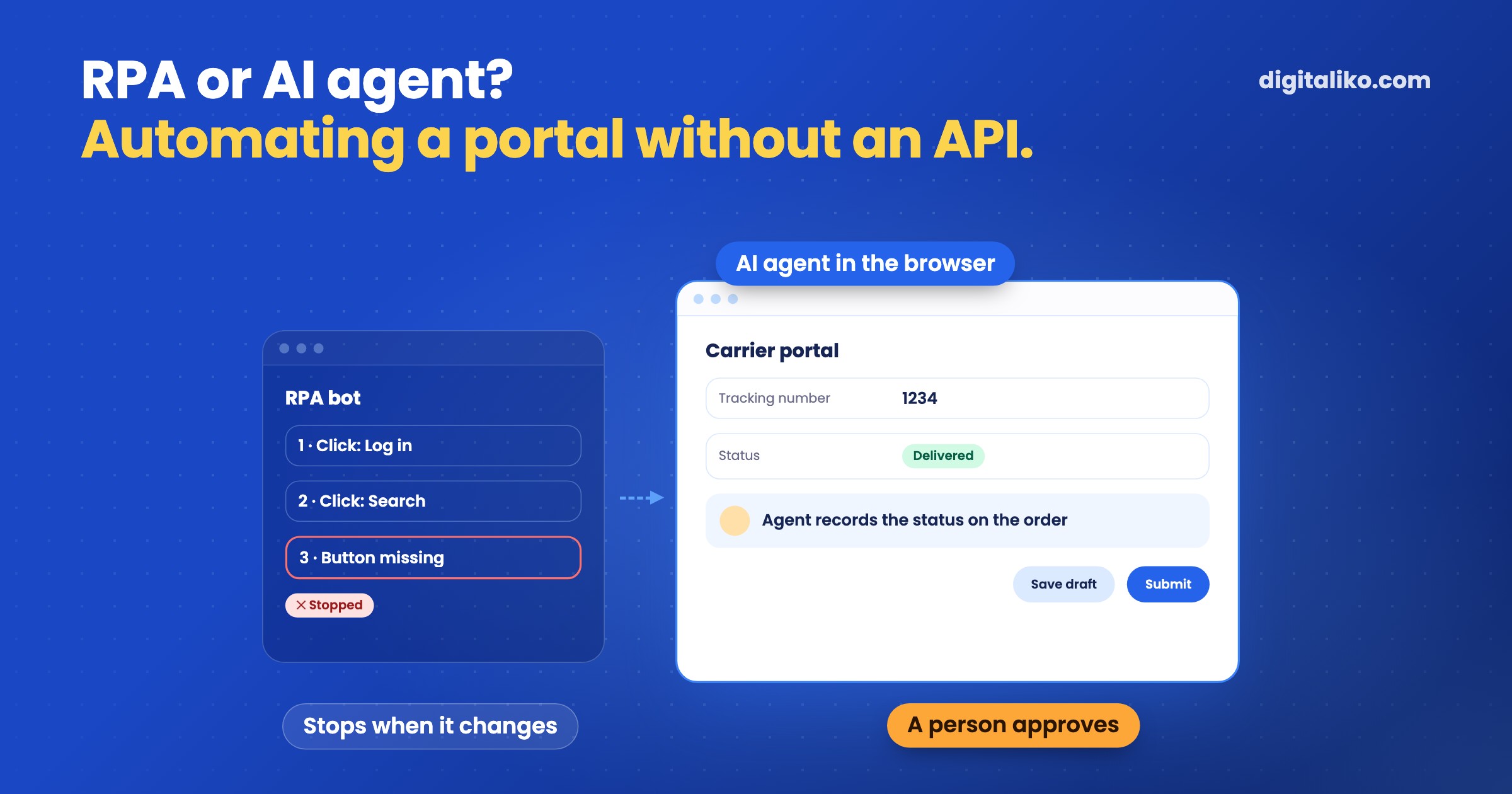
A portal without an API can be automated in two ways: with an RPA bot or with an AI agent in the browser. Both log in with your access, fill in a form, check a shipment status or download a document. The difference is what they do when the page looks different from yesterday.
An RPA bot repeats recorded clicks and stops when something changes. An AI agent reads what it sees on the page and hands exceptions to a person. Below you will find when a bot is enough, when you need an agent and what a person should always approve.
What is RPA and what is an AI agent in the browser?
RPA (robotic process automation) is a software bot. Someone shows it once where to click and what to type, and it repeats that. Fast, precise and without getting tired. Until a button moves or a new window appears.
An AI agent in the browser gets a goal, not a list of clicks. "Find the shipment status for order 1234 and record it in the system." It looks at the page, finds the field for the tracking number and reads the result. When something does not add up, it should not guess. It should say so.
RPA bot
- Repeats recorded clicks and typing.
- Fast and cheap when the screen stays the same.
- Stops or clicks the wrong thing when the page changes.
- Fits the same work in a program that does not change.
Where the page changes
AI agent in the browser
- Gets a goal and reads the page itself.
- Copes with small changes and with data in different shapes.
- Slower, and every step costs something.
- Fits where the data or the page varies.
Often the right answer is a combination. Stable steps such as logging in and exporting are done by a plain script. The agent steps in where something has to be read and decided. We cover the difference between fixed automation and an agent in Agentic workflow vs automation.
Which portal work is worth giving to an agent?
Work where a person today copies data from one window into another. Typical examples:
- Shipment status. Every day people open the carrier portal, look up shipments and reply to customers. The agent checks the status and records it on the order.
- Orders on a supplier portal. The supplier has no import, only a form. The agent fills it in from your order and a person submits it.
- Documents to download. Invoices, statements and confirmations that only exist in the portal. The agent downloads them and saves them where accounting expects them.
- Entering data into a portal without an import. Data you already have in your system has to be clicked into a partner's portal by hand. The agent prepares the filled-in form.
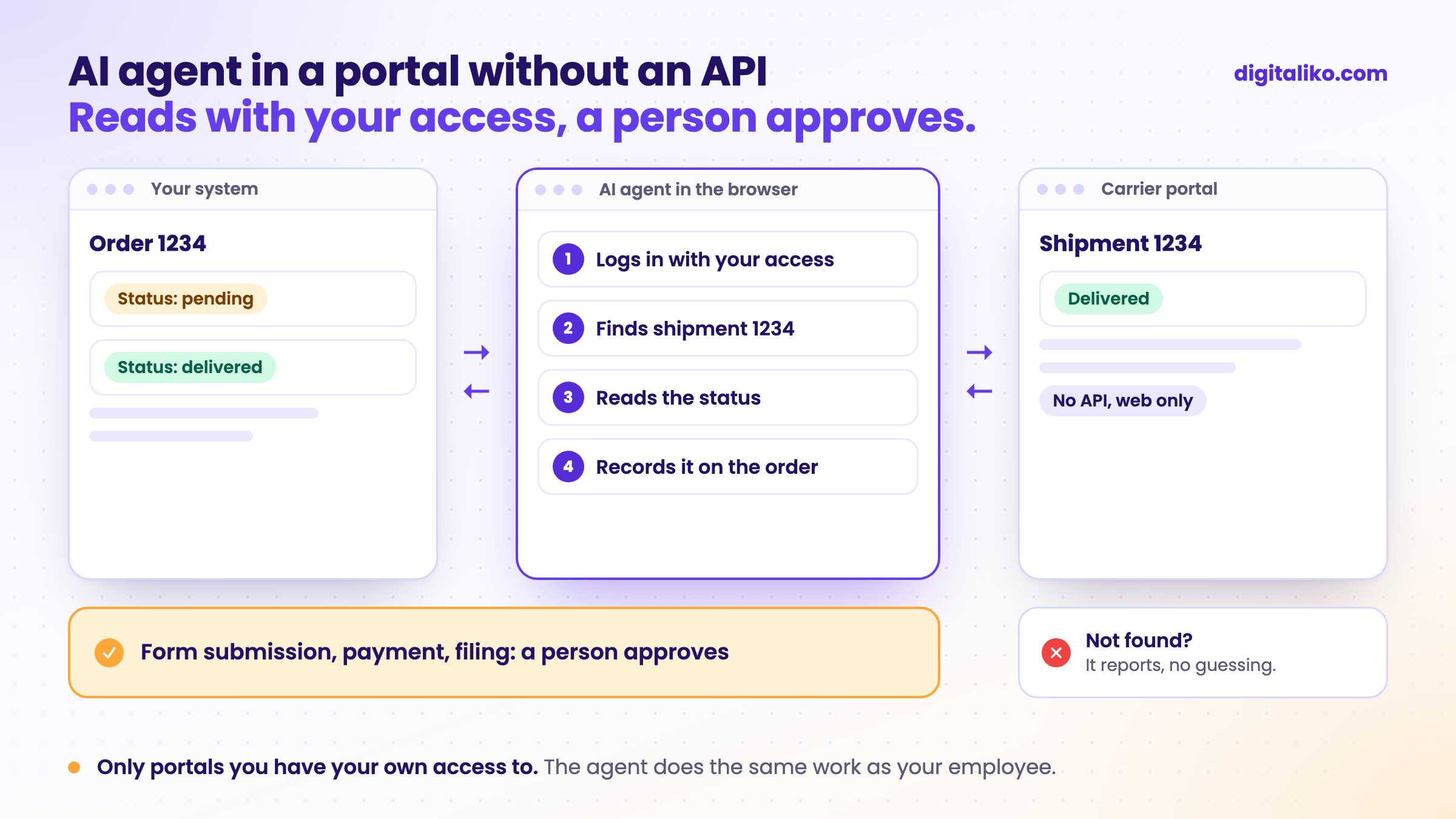
What they have in common is that the result can be checked. The shipment status in the portal is either there or it is not. If the agent does not know what to do with the result, it is work for a person.
How do you introduce an AI agent to a portal without an API?
Whoever lets an agent into a portal with the right to submit from day one will sooner or later submit something wrong. That is why we recommend this order:
01
Ask about an API or export
Ask the portal operator whether they have an interface, an export or a bulk import. If they do, it is more stable than the browser.
02
The agent only reads
It checks statuses, downloads documents and records them on your side. It writes nothing into the portal.
03
The agent prepares, a person submits
The form is filled in, a person checks it and submits it. Every correction goes into the agent's instructions.
04
Proven steps run on their own
Only those where the person no longer corrects anything and a mistake can be undone. The rest stays at step 3.
Step 1 looks like a delay. In reality it can save the whole project. If the portal can return the data through an interface, you need neither a browser nor an agent.
A typical first step looks like this: every morning the agent goes through the carrier portal and records the shipment status on open orders. It writes nothing into the portal, and a person sees what the agent found and what it did not.
What breaks when you automate a portal?
The portal is not yours. The operator changes it whenever they want and does not tell you. Plan for that from day one:
| What happens | What the agent should do |
|---|---|
| The portal changes its layout or form | Report what it could not find. Not guess where to click. |
| Login requires a code from a phone | Wait for a person. Not bypass the verification. |
| The portal shows a check that you are not a robot | Stop and let someone know. Not bypass it. |
| The portal returns an error or nothing | Try again later, then hand it to a person. |
| Data in the portal does not match yours | Not overwrite it. Show the difference to a person. |
There is one rule: an agent that does not know asks. An agent that guessed will later give you more work than it saved. We cover the limits it needs in AI guardrails: what a business AI agent must not do.
Is an agent allowed to work in someone else's portal?
The agent does the same as your employee, with their access. Even so, read the portal's terms before you start. Some forbid or limit automated access. If you are not sure, ask the operator. This is not legal advice.
The agent should have its own login if the portal allows it. Then you can see what the agent did and what a person did, and you can revoke the access at any time.
Checklist before you brief a supplier
Tick what is true for you. Ask the supplier about the rest:
When we do not recommend it
- The portal has an API or an export. Use it. The browser is only the second option.
- You use the portal a few times a month. The agent will not pay for itself. The steps in the checklist are enough.
- The portal terms forbid automated access. Do not do it. Ask the operator for another solution.
- You want the agent to pay or file with authorities on its own. We do not recommend that. Leave those steps to a person.
Are your people losing time in portals?
Write to us which portals they log in to every day and what they do there. We get back to you within two business days with a few questions about your work. Then we agree on what we do first.
If you'd rather talk first, book a 15-minute intro call.
How we build such an agent is described on Custom AI agent for business. What an AI agent is and when you do not need one, we explain in What is an AI agent?
Which portal do your people open ten times a day?
In short
- Both an RPA bot and an AI agent can handle a portal without an API. The bot repeats clicks, the agent reads the page and hands exceptions to a person.
- First ask the operator about an API or export. It is more stable than the browser.
- The agent first only reads, then prepares, and a person submits. Only proven, reversible steps run on their own.
- Only portals you have your own access to and where the terms allow it.
Frequently asked questions
What is RPA?
RPA (robotic process automation) is a software bot that repeats clicks and typing in a program or on a website exactly the way someone taught it. It is fast and cheap until the screen changes.
What is the difference between RPA and an AI agent?
An RPA bot repeats recorded steps. An AI agent reads what it sees on the page and decides where to click. When the page changes, the bot stops, while the agent often copes. When there is an exception, the agent should hand the work to a person.
Can you automate a portal that has no API?
Yes, if you have your own access to it and the portal terms do not forbid it. But first ask the operator about an API or an export. If one exists, it is the more stable route.
Can an AI agent submit something in a portal on its own?
Reading and preparing, yes. Submitting an order, a payment or a filing with an authority should be approved by a person for the first few weeks. Only proven steps where a mistake is cheap and reversible should run on their own.
What if the portal changes?
That is why the agent should report when it cannot find something instead of guessing. A bot built on fixed clicks stops. An agent copes with a small change and hands bigger ones to a person.
Ask AI about this article
The AI also draws on our other articles and experience from real projects.
ChatGPTClaudePerplexity

